

How do you get the photo above and not the next one?

PowerPoint or Keynote
PowerPoint and Keynote presentations often take place in a dark room. So if you use a flash, even just off camera you might end up with something like the photo above, where the screen is washed out.

If you are not careful you will end up with a silhouette as I have in this photo above. Hey that might work occasionally, but don't you want to see the presenter at some point in your photos and their presentation?
Off Camera Flash using Zoom

In this photo here, with the man in the red vest, I put the Nikon SB-900 flash off to the side and zoomed the head to 200mm. The Nikon SB-900 is on the PocketWizard Flex TT5 and on my camera is the transmitter which is the PocketWizard Mini TT1 with the AC3 to control the output of the flash.
While this is far superior to the first photo it can still be better.
Use a snoot on the hot shoe flash

In this photo you can see the speaker and the power point equally well. Now the people closest to the camera are in the back of the room where some of the fluorescent lights are on and giving that green cast.
I played with the exposure compensation on the camera and the flash. For the photo where the best exposure works, I dialed the camera to -2 stops and the flash to +1 stop. Since I am basically overriding the auto exposure of the camera and flash there really is no settings that will work exactly the same every time. It will for that room, but could fluctuate even then. I just know to do a few test shots getting the settings the way I like them and then start shooting to capture moments.
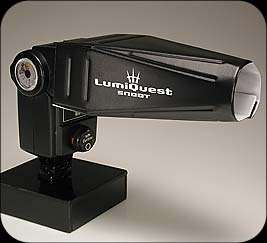
I put over the SB-900 the LumiQuest Snoot to help keep the flash off the screen and only on the speaker. It is just $23.95.

Here you can see the setup. Now notice there are a few light leaks around the snoot kicking light back on the wall. Not a real big deal for me in this situation. However, it could affect you in another situation. Just take some gaffer tape and wrap around the snoot covering that up if needed.
No comments:
Post a Comment
All comments are reviewed.This is done primarily to eliminate spamming. Please be patient, I maybe on assignment and unable to review right away.
But to increase meaningful conversation, sometimes it’s necessary to reduce the not-so-meaningful bits. Here are the kinds of things we’ve been deleting in recent posts. Please avoid these types of comments:
One-word comments like “Cool!” or “Thanks!” While we appreciate the congrats, we’d love to hear more about what exactly you love, and (even more importantly) why.
Shameless self-promotion. Comments that contain links to your site within the body or otherwise encourage folks to visit your blog are a no-no. If you’d like to increase traffic to your blog, there are other places than here to do that.
Multiple comments by one author. We’re glad you want to be engaged, but please give others a chance to speak, too.
Really long comments. Let’s just say that if you need to take more than three breaths to read your comment, it’s probably too long.