
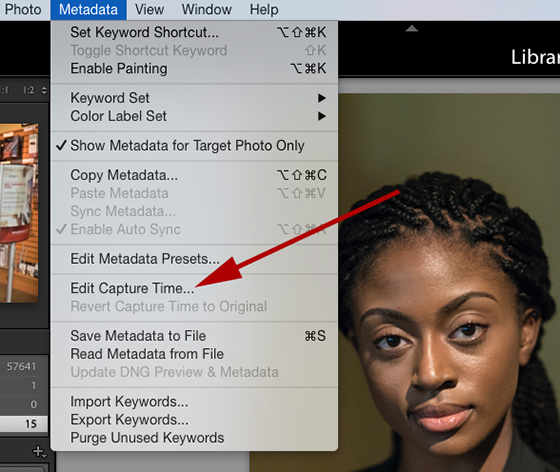
Yesterday I shot an event with a friend. We were posting these to an online photo gallery for the client. Well we discovered that the cameras were not all set to the correct time. Uh-oh!
You might need to change the capture times if you traveled to a different time zone and didn’t change your camera’s date/time setting before you started photographing, or if you imported a scanned photo into Lightroom, the photo would contain the creation date of when it was scanned, rather than when it was taken.
Select all the photos you want to adjust first in Adobe Lightroom.
The photo above shows where you will start to fix the date and time. Go to the <Metadata> menu item and then click on <Edit Capture Time...>

This is what will show up. You will have three options here. The first choice is to Adjust to a specific date and time. The Original Time is what the setting captured. Then go to the Corrected time and put what you need it to be and then click on change to adjust it.

The second choice works really well when you might have just had the camera set for a different time zone and need to adjust it by hour increments. Then the pop up choice on the far right is all you need to choose a hour adjustment of +/-.

The last choice will change the creation date as well as the correct time. These are actually two different fields embedded in the photo. Great for scanned images where the creation date wasn't when it was scanned.
There you have the directions to change the date if your camera was not set correctly. This is great when you have multiple cameras and you need them all synced for the client to see the photos in the order they were shot.
No comments:
Post a Comment
All comments are reviewed.This is done primarily to eliminate spamming. Please be patient, I maybe on assignment and unable to review right away.
But to increase meaningful conversation, sometimes it’s necessary to reduce the not-so-meaningful bits. Here are the kinds of things we’ve been deleting in recent posts. Please avoid these types of comments:
One-word comments like “Cool!” or “Thanks!” While we appreciate the congrats, we’d love to hear more about what exactly you love, and (even more importantly) why.
Shameless self-promotion. Comments that contain links to your site within the body or otherwise encourage folks to visit your blog are a no-no. If you’d like to increase traffic to your blog, there are other places than here to do that.
Multiple comments by one author. We’re glad you want to be engaged, but please give others a chance to speak, too.
Really long comments. Let’s just say that if you need to take more than three breaths to read your comment, it’s probably too long.