Showing posts with label video. Show all posts

Friday, March 17, 2017

How to Video Capture more than 29 minutes with a Nikon D5

Fuji X-E2, Fuji XF 55-200mm, ISO 1250, ƒ/5, 1/100
Last night I photographed and video captured the show Oklahoma!. Just a last minute push to encourage you if you are in Roswell, GA to come and see the play. Runs through the weekend. Go here to buy your tickets or at the door.


For video capture I attached to my Nikon D5 using the HDMI output the Atomos Ninja Blade 5" HDMI On-Camera Monitor & Recorder.

Why did I do this is a great question. Most all DSLRs that record video have a 30 minute time limit. I understand this has to do with avoiding a double tax in some countries.

So how do you record a musical as I did that goes an hour and half for just the first Act? This is where the Atomos Ninja Blade comes to the rescue.
Atomos Ninja Blade 5" PRODUCT HIGHLIGHTS
Key Features
325DPI, 5" IPS 1280 x 720 capacitive touchscreen monitor/recorder.
Waveform RGB & luma parade, vectorscope with zoom, and test pattern generator.
Adjustable gamma, contrast and brightness.
HDMI input and output.
Real-time monitoring, playback, playout to a PC or Mac with QuickTime, and edit logging.
Focus peaking, 0-100% zebra, and two modes of false color monitoring.
Records 10-bit, 4:2:2 in ProRes or DNxHD.
S-Log / C-Log recording.
Trigger REC/STOP from camera (Canon, Sony, ARRI, Panasonic, RED, JVC)
Timecode from camera.
2.5" HDD/SSD media storage.
It records up to 1080 30p/60i resolution via HDMI to an available HDD or SSD using either Apple's ProRes or Avid's DNxHD codecs. Recording at 10-bit with 4:2:2 color sampling, this unit provides you a monitoring and recording solution in one compact battery powered unit.

Now I bought the ADATA Technology 256GB Ultimate SU800 SATA III 2.5" Internal SSD card.

This setup worked great for last night's opening night performance.

Fuji X-E2, Fuji XF 55-200mm, ISO 1600, ƒ/4.7, 1/100
While the Nikon D5 will record 4K I don't need this most of the time, so the Atomos Ninja Blade 5" was perfect.

If however you would like to record at 4K you can get the Atomos Shogun Flame 7" 4K HDMI/12-SDI Recording Monitor. They make other higher end models as well.

Nikon D5, Sigma 120-300mm ƒ/2.8 DG OS HSM | S, Sigma TC-2001 2x, ISO 5000, ƒ/5.6, 1/250
If you are not a video shooter and are more of a stills shooter then for capturing video you need to be a little more hands on technically.

What I mean by this is that the exposure and sound vary through a production and you may need to adjust this as you are recording.

With the Nikon D5 attached to the Atomos Ninja Blade using the HDMI port just siphons this off before it hits the H.264 encoder and you are recording in ProRes format. This isn't really recording in RAW video but more like a TIFF file than say a JPEG.

Now I cannot share the Oklahoma! video because of copyright. [I am recording it for the Shuler Awards in Georgia]

The cool thing is right now you can buy the Atomos Ninja Blade 5" for $395 without a hard drive which gives you the 5" monitor. I would recommend buying a SSD hard drive of your choice in size.

Fuji X-E2, Fuji XF 55-200mm, ISO 2000, ƒ/5, 1/100
There are three more performances for me to tweak my exposure and sound on to capture the best quality possible out of my setup. At the same time each performance traditionally gets better each time.

Fuji X-E2, Fuji XF 55-200mm, ISO 1000, ƒ/4.5, 1/100
By the way Aunt Eller is my daughter Chelle. This is her senior year and last production. She also taught the choreography to the cast.

Fuji X-E2, Fuji XF 55-200mm, ISO 5000, ƒ/4.7, 1/100
I hope these tips will help you thinking of ways to use your DSLR to do more than just take photos. I know I wanted to use the high quality CMOS chip to get a wonderful keepsake video of our daughter to cherish for the rest of her life.

Wednesday, June 29, 2016

Stanley's Compact Lighting kits for the road


This is my lighting gear for travel when flying.

  • (2) Manfrotto 5001B Nano Black Light Stand - 6.2' (1.9m)
  • (2) Interfit Metal Umbrella Bracket with Adjustable Flash Shoe
  • (2) Cowboystudio 33 inch Photography Studio Translucent Shoot Through White Umbrella
  • (2) Neewer TT850
  • (2) Neewer 433MHz Wireless 16 Channel Flash Remote Trigger
  • (2) ThinkTank Strobe Stuff
  • (2) MagMod flash modifier system
  • Gitzo GT0531 Mountaineer 6X Carbon Fiber Tripod Legs - Supports 11 lbs (5kg) & Manfrotto ball head
  • ProMaster XC525 Tripod
Just keep it simple.


When Shooting Video I just bring in my suite case these two lights.
I also just bring one extension cord to use with the lights as well.

There you have it a simple light kit to travel the world shooting stills and video. 

Wednesday, August 26, 2015

Are you stuck in Ground Hog Day like Bill Murray's character Phil was in the 1993 movie?


Back in 1993 Bill Murray and Andie MacDowell starred in Groundhog Day. It was a story where a weatherman finds himself living the same day over and over again.

He is learning from his mistakes and even intentionally makes bad choices due to his bad attitude.


While I would love to wake up each day looking like I did in college that just isn't happening.

Here I am with my Nikon FM2 and the Nikkor 80-200mm ƒ/4. The ƒ/2.8 hadn't been made at this time.

The lesson of Groundhog Day was really simple, you don't get 2nd chances so do your best to make your actions positive. You reap what you sow as the saying goes.
"Moore's law" is the observation that the number of transistors in a dense integrated circuit has doubled approximately every two years. The observation is named after Gordon E. Moore, the co-founder of Intel and Fairchild Semiconductor, whose 1965 paper described a doubling every year in the number of components per integrated circuit,[note 1] and projected this rate of growth would continue for at least another decade. In 1975, looking forward to the next decade, he revised the forecast to doubling every two years. – Wikipedia
Since 1975 until a couple of years this was still holding pretty true. The impact this had on the rest of society and particular photography was incredible.

Just in the last 14 months Sony has introduced 11+ top end mirrorless cameras. A few years ago we were talking about short duration flash to stop objects and now we are talking about High Speed Sync as a way to stop action using strobes.

photo by Robin Rayne Nelson

Education


How much have you spent on gear the last few years and then how much have you spent on education? Most of us would benefit by spending more on education than on gear.

Here are some great educational opportunities I recommend for example:

photo by Robin Rayne Nelson
I believe the best way to learn is by doing and having someone with you teaching you as you are doing. The workshops I lead are more about hands on experience and the instructors speaking into your project as you work on it. 

Bill Murray's character Phil in the movie Groundhog Day used the repeat of a day as a workshop where he learned from his mistakes. Since Groundhog Day movie is fictional we have to look for other ways to learn how to make the best choices so we can stop the insanity of not growing but just feeling miserable. 

I would love to work with you and help you develop some new skills to help you be better prepared and able to anticipate what clients need. Give me a call or write to me so I can save a spot for you this January in Chiapas, Mexico.

Wednesday, May 27, 2015

Nikon D4 Video Settings


This is based on my experience and others may have other suggestions that might contradict my comments.

When shooting video on your Nikon D4 there are a few settings I recommend. When this becomes very critical is when you decide to start shooting more than one camera and you need everything to match when you get into post production.

In my opinion editing RAW images in Adobe Lightroom and getting images to match from different cameras is much easier and more accurate than in the video editing software of Adobe Premier or Final Cut Pro X.

Before you go to the Movie settings on the camera I recommend first creating a menu bank for Video as I have done here. This way once you have created all the settings they are saved.


In the movie Settings choose your Frame Size/Frame Rate. The standard Frame Rate for movie theaters and TV is 24 fps.

When you pan left to right or right to left this is when you will see Frame Rate really affect the look and feel of the image. The public is so used to 24 fps that this is the best default. Some use 30 fps.


Many times people will shoot higher Frame Rate to then do slow motion by slowing it down to 24 fps.

Your shutter speed on the camera should be set to twice the Frame Rate for the movie settings. If you are shooting 24 frames then you will be at 1/60 since this is the closest. If you shoot 60 fps then 1/125 should be your setting.


I shoot most of the time on 1080/30fps and set also for High Quality.


Microphone setting for most all the time needs to be set manually and use the Sound Levels to adjust the volume of the recording. I highly recommend using headphones and looking at the audio meter on the viewfinder. Be careful because the recording level and the headphone volumes are set separately.


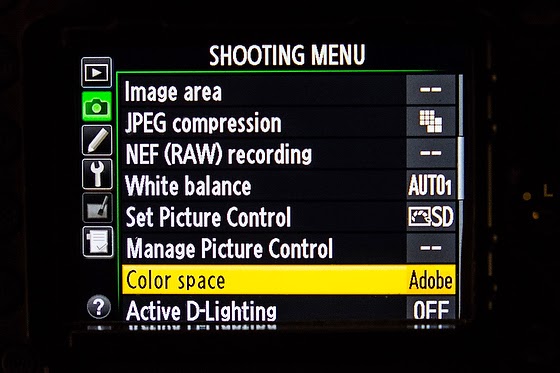
I have my color space set on Adobe RGB. You also want to then set the Picture Control.


Some of this is personal preference, but the key is if using more than one camera that all the settings be set the same or you will have trouble matching the video and color can look off switching between the cameras.

When you go to Live View in the movie mode you will be able to then adjust your microphone levels and exposure. To prevent light entering via the viewfinder from interfering with exposure, close the viewfinder eyepiece shutter.

You should go to manual mode to have the most control over the settings. Just a little movement by a subject can make the exposure to change even when the light stayed the same. Use manual mode.

As you can see from this chart you have the ability to control more in manual mode.

As far as focus I tend to use autofocus when I first have a subject framed and then go to manual focus.

The motor for lens tends to make a noise I don't want to pick up.

Microphone

I recommend using a lavalier microphone for interviews and for natural sound and quick moving situations I recommend a shotgun microphone.

Here is an earlier blog post I did to help you with audio recording.

Friday, April 04, 2014

Stills + Video | NOT Video OR Stills


A client wrote to me the other day.  Here was her question:
CLIENT:  A production company did a video on cup recycling, and I noticed this evening that if we could get stills from the video, we'd actually have most of the images we need. I recall you saying once that stills from video on are not high res/print quality. But I went back and asked, and they assured me because they shot it in high def, they could create hi res stills. In your opinion, is that accurate?
I responded first with these two sentences:
STANLEY: First I am really impressed you remembered my comment. My comments were not so much about the resolution, but how they are shot. 
Then I went on and talked about these points below here.  But to inspire you to read on here was her response to my comments:
CLIENT: This is AWESOME, Stanley. I hear every word of what you are saying. All  of it. I am taking it to heart and will influence this on my own team.
Aesthetic

Video is about movement and stills are about a moment. This changes a great deal of how things are shot. Often many moving shots are not very compelling when you freeze them to one frame from that movement.

This is why on every movie set has a still photographer. The stills are done slightly different than the video. 


The Technical

If the video camera is 4k then you might have a pretty high-resolution image that is usable, but if I were to grab a frame from my video DSLR camera it still isn’t the resolution when the camera is set for still photography.

Today many crews use a 4K camera that is very much a usable high-resolution still image for print and the web. Just want to be sure the image is sharp. Sometimes during the movement the sharpness of a single frame isn’t that noticeable until you grab just the one frame.

If you like the image in the video and it was shot on a 4K video then the frame may just work.

Know who is pitching to you

There is way too much emphasis on video. Those promoting it are selling them on this is a replacement to stills—BIG MISTAKE!!!

Those motion capture guys [new name for videographers] that are promoting this as a replacement really are showing lack of knowledge of the industry.

The News Media

The news media have gone through a lot of changes due to digital and most importantly since 1995 the web.

For the first ten years the issue that slowed the progress was the bandwidth. It took a while to get us from dial up to now the ability to stream HD video on the web.

Once the ability to deliver video became possible many naïve PR folks started to think this is the new standard and that the still image was dead.

I recommend before reading further you go to these television websites where you would expect the video to be king. Take a moment and do the following.
  1. When looking at the main page notice how many images in general are used and how big the images are as compared to text.
  2. Pay special attention to the visual promoting a video link.
  3. Click on a few of those links to the videos.
  4. How often did the still image you click on actually show up in the video?
  5. Do your own survey of a few of the stories on the website.
Here are the links I recommend that you take a few minutes to do your own research and then come back and read the rest of this blog. [FYI to avoid copyright infringement I did not copy the screens and post them here]


Newspapers even realize after trying to lead with video for a while that the numbers don’t lie. People will click on the still image galleries more than they will watch a video.

Good article addressing the use of stills as engaging  Photos on Facebook Generate 53% More Likes Than the Average Post  

Notice that even when all these news articles talk about Photos and Video they are using only stills or graphics for engaging you and not a video Photos and video drive the most engagement on social media

My point is you have video production companies over selling and burning chunks of your budget on video when your media may need that, but need still first. Video is in addition and not a replacement for stills.

So think about it this way. You have the opportunity to supply all that an editor needs to post to their website the way they post their own stories. Sure in a pinch they may grab a frame from a video, but this is the exception and not the rule for even TV.

I think that PR needs to start supplying the package as the media shoots it. Way too many PR firms continue to operate the way they did in the 1970s. They continue to pitch is assuming new media outlets have the budget to come and cover their event. Get them to like the story and let them come and cover it, that was the mentality back 30 years ago.

This is 2014 where their budgets have all been slashed. I worked at Georgia Tech where we supplied the entire package. Text, Stills and Video for packages and were used all over the media regularly. On average we were in the AJC every day of the year. 

Georgia Tech is still ranked one of the top schools and it had a great deal to do with the PR office I worked in for more than 10 years created. John Toon, director of communication for many years, was the master of getting stories placed. He knew to not pitch something just because a researcher or professor wanted it promoted. He vetted those requests and help to get the cream of the crop.

When John Toon’s material went to a news director desk they opened it because he was known for giving them great content and in a way they could use it with very little effort or budget on their part.

Both—Not Either/Or

Please don’t hear me saying don’t use video and use stills instead. I am saying you need stills and video. I think video production companies does a disservice when they tell you they can do it all and they never have their material in major magazines or news outlets on a regular basis.

Many of these companies produce high-end video that is used in meetings and events. Their work is superb. But it isn’t what the media creates and runs. 


Monday, January 27, 2014

How will your audience see your photos?


Print

When you are shooting for print and especially a magazine you would compose some photos for the cover. You leave a little more space than you would had you not been trying to make room for the text that needs to be on the cover.

Most editorial photographers are paid more if the photo runs bigger as well as for how many photos they use in the printed piece. Getting a double-truck [two full pages--side by side] also will give you more money.  Here you have to take into account the gutter, the place where the two pages are divided.


Sometimes they use one photo that bleeds off the pages or sometimes a grouping like here above. Most designers are aware of the gutter and minimize this affect on the image.

Knowing you are shooting a photo story most pros will do all they can to make the images so good that the editor feels like the story must be on the cover and get extra pages. This not only helps the story be told, but the photographer also benefits from a bigger pay check.

The designers used to joke with my mentor, Don Rutledge, they they thought he had templates inside the viewfinder to help him help them with layout. Really Don shot so many variables in situations that for any situation he usually had a cover shot, a double truck, some variation of the double-truck and then some tighter shots for impact.


Computer

Today the most likely place your photos will be seen are on the web. This is a horizontal space and the general rule of photography is to fill the frame of the camera and watch the corners. This also applies to your photo when filling the hole the designers are working with on the computer screen.


This is how a vertical shot will look in the space for a designer. This is the space it would fit within a video. The video format is about 16:9 proportion.


Now the photo of the man here is the full 3:2 frame from the camera placed inside the 16:9 format with no cropping. While this is much better, the designer would prefer to fill their space and so too does the video editor.

My suggestion is to shoot a little looser giving some room for the cropping. I know some photographers will even put some guides over the LCD screens to help them with their framing.

If you really want to grow your business, be the guy that not only shoots for the use that the project is intended, but to meet other uses. This is great stewardship because you can show to the client that they now can use your photos for many other things from brochures, newsletters, displays, PowerPoint, websites and more.

Besides understanding the proportions you need to think of what they audience is using to view your work. This is where knowing your demographics can help you plan the coverage better.

What it the photos are going to be used in a video that will be put on a website. Now if your audience is mainly going to the web through a desktop or even laptop you would shoot this differently than if they are using a Smartphone.

If the experience will be on a mobile device like an iPad or iPhone, then shoot tighter. A panoramic shot with a person in the corner just doesn't read well on a 3" screen. This is where tight shots of faces and objects are better for the space.

Think of how you tell time. Be sure the face of the clock fits the space to be able to tell the time.


This photo of the watch makes it easy to tell the time.


As you can see in this photo the watch and clock are about the same size.  If your point is to see what time it is, get closer than this photo. On a iPhone in a video playing at full speed this image would loose it's ability to communicate.

Are you asking the client, "What is the end use of the photos?" If not you need to do this and then you need to plan to be sure your photos make the best use of the space. 

Sunday, December 08, 2013

Is all your company communication treated the same?


Are you a good steward of your communication budget for your company? What am I asking?

First we need to understand really what stewardship is all about. According to Webster's Dictionary it is “the conducting, supervising, or managing of something; especially:  the careful and responsible management of something entrusted to one's care.”

In the headlines this week and spreading all over the web "Corporate profits almost double historic norm."  Check out this article by Jay Bookmen on it here.

When things are going well and you are not pinching pennies is when you are most prone to wasteful spending.

Be strategic and plan out your corporate communications. Do this using the pyramid above. Every corporation has main objects for the year and then there are other things that still need to be done, but are always behind those key initiatives.

A Level 

In your top category put those things that are the most important. Now this is where you will dedicate more time, space and budget to communicating this than all the other items. For example you would have this lead or be in every newsletter you send out. You will make videos here because you know you will use those over and over again.  You commit to writing about this in different ways. It may even be a special place on your companies main webpage.

B Level

These are items that had it not been for those in A Level would be. You commit to only communicating regularly on these topics maybe once a month in the newsletter rather than the weekly newsletter. You will make less videos on this because they will not get used as often.

C Level

This level means that you are committed to the topic and may do a quarterly story or project to keep this in the companies mind.

You still may do a few pieces that do not fit in A, B or C, but those are more of a one off and not committing the resources at a level to really tax the budget. You may have also departments coming to you for help, but if they don't fit into the plan you may turn them away explaining how they are not part of what the company has decided as a priority. Maybe they fund that themselves.

Possible Scenario

Your company is rolling out a new product. You decide to produce a video for the company internal people to get everyone on board. You decide that you will use this piece in the annual meeting, quarterly meetings and in department meetings. Due to the wide use of the project and the importance of it, you want to be sure it is a high impact piece. The production quality is important since it will be used on large screens.

Contrast this to one of the many C Level projects that go up on your company website every week and come down after a week or so. Do you commit the same level of production to something that has a short life span?


Gold, Silver or Bronze

Many companies like a certain quality of video. They are producing what amounts to a small Hollywood Film. The problem is they are producing this quality all the time when the simple news cast quality we see each night on the six o'clock news would work not just fine but perfect for communicating our message.

Consider in your communications about creating levels of product and when they will be used for your tiered communication strategy.  You may have a news cast, documentary and Hollywood produced videos all used in the A Level. However, you may only have documentary and news cast quality in the B Level.  You may be fine with using a news cast quality or non at all for the C Level.

Being a good steward is putting the right amount of resources to accomplish the goal. Don't over do it even if it is A Level.

Just because you have the money, don't always spend it all.  Spend what you need and no more.

Thursday, November 14, 2013

Nikon D4 Audio recording in video mode


While I read all the manuals it takes some practice to really refine your results when shooting with any camera gear.

My first recommendation is to choose manual sensitivity on your microphone. When the microphone is set to Auto and your subject stops talking the Auto setting will crank up the gain [volume], which will introduce noise or a hum in the background.

After a lot of trial and error I have noticed that if you move above the setting of 7 on microphone setting you will introduce a noise.


My recommendation is to buy an external microphone. I have two. I normally record all my interviews with two cameras. One camera that is pointed straight onto the subject has the shotgun Røde Video Pro microphone on that camera. On the second camera that is to one side or another has a wireless lavalier Shure FP1 microphone on it. WL183 (Omnidirectional): Recommended for general purpose sound reinforcement, recording, or remote monitoring applications. Low handling noise. Pickup angle: 360 degrees. Clip on the subject and keep close to their mouth. 


    Both of these microphones are designed to work with the DSLR video cameras. They have a stereo 1/8" plug to put the mono sound on both of the channels. Next both of these microphones let you boost the gain so that the sound coming out of the microphones is boosted so you do not have to turn your gain up too high on the camera.


    The Røde microphone has a +20 dB gain. My recommendation is to use this setting and then listening through your headphones adjust the input gain level. By doing this you will avoid most of the time going above the 7 gain level on the Nikon D4.


    On the Shure FP1 lavalier there is on the transmitter and receiver gain controls. My mistake early on was I only adjusted the receiver. If you turn both of these all the way up, just like with the Røde microphone you can avoid going above 7 on the gain setting with the Nikon D4.

    If you continue to find that you need higher than 7 on a regular basis then you need to get an amplifier on the line to increase the volume so you can keep that number lower than 7 on the Nikon D4.

    You may want something like the Beachtek DXA-SLR PRO HDSLR Audio Adapter, which will let you increase the volume so you can keep the gain level lower on the camera.

    Tuesday, November 12, 2013

    Multimedia is the way to go when going back in time


    I am working on a project this year where I am interviewing graduates of the IMPACT 360 gap year program located in Pine Mountain, Georgia.

    The audience for these videos are high school graduates who have not gone to college or have only one year of college completed as well as their parents.

    While there are many questions that this audience will have depending on their individual situations, there are a couple of questions which most all will have for a person who completed the program.

    I think the best question for just about anything you are doing is WHY? This is the question that gets to the heart of most any story. Why should the audience care?

    So my first question I asked of Nathan McFarland was why did he choose IMPACT 360 gap year program.

    The second question was how did IMPACT 360 help him in his ultimate purpose for college--getting a job.

    The last question I wanted him to address was how did this impact his college plans? Did this one year gap program add more time to his college years?

    I wrote to Nathan and gave him the over all questions and asked him if he could try and answer these questions in two or three minutes.

    The first take was great, except for people walking by and talking over him. The only reason I needed to do more takes was so I could get my assistant to help keep people quiet for the three minute interview. Take a look and see what we did for this interview.


    Thank goodness for the Ken Burns effect. While this technique was not invented by Ken Burns it is he who made it famous with his documentaries like the one he did on the Civil War.


    This is a screen grab from Final Cut Pro X where I edited a still image into the video. The great thing about this technique is you can find photos of people from before you talked with them. We asked Nathan for photos of himself at Florida State University that we put into the package and IMPACT 360 had some photos of Nathan in the program that we also included.

    The effect of moving around a still image helps create a motion that helps move the story along. You do not need to use this and sometimes it works against you. I think sometimes we over use this technique, but it is helpful.


    Wednesday, October 16, 2013

    Shooting with Heart or Head is often a camera choice


    Stills vs Motion

    When a still photographer photographs people they are able to quickly capture decisive moments. For the most part they are reacting to what is happening in front of the camera. Those who do it the best are good at anticipating a moment, but still the are reacting to how people are behaving in front of them. Most photographers are able to shoot from their heart because when something moves them they are able to capture it.

    When a videographer captures something over time. They start rolling and then stop at some point. They cannot just react to a moment and turn the camera on. The videographer must think about what they want to capture and plan out their coverage.

    The major difference with shooting stills [photographs] and motion [video] is shooting from their heads. They cannot shoot from their heart. They must plan their shot more than the still photographer.


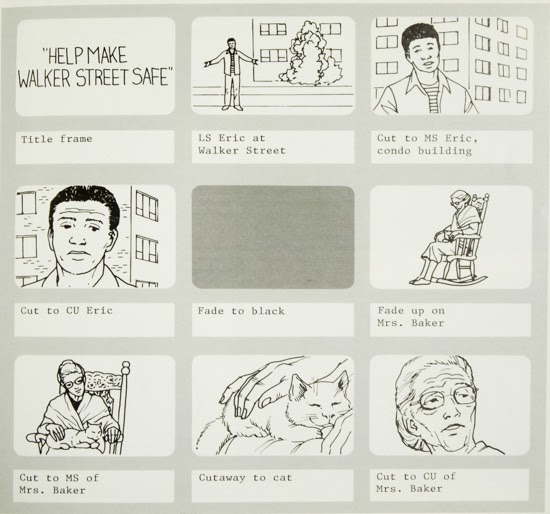
    This is an example of a storyboard from the book Using Your Camcorder by Mandy Matson.

    Every book on capturing motion will address the need to plan your shots list out before hand. You will find every one recommends storyboarding your shots so you have a good idea of what you are planning to get.

    As far as just capturing daily life it is rare to get the same emotional content that a still photographer will capture because they cannot just react, they must plan their shots.

    When filming for a movie they not only shoot to a storyboard they must create the emotion through the actors. As we know there is usually one angle that can improve the emotional moment than another. Many times the storyboard will have multiple camera angles to jump from to help make this work. They are filming Dumb and Dumber here in Atlanta. Take a look at some of the photos shot of the set by John Spink the AJC photographer here. You can see the same scene shot by John from what is two different places on the set. The reason he was able to do that, is they will redo the scene over and over for different camera angles or variations from the actors themselves.

    When in the editing suite they are picking from multiple camera angles and different performances to then craft the scene.

    As you can see to shoot video the head is how it is done and not reacting from the heart in the moment.

    The one thing that video does have over stills for capture emotion is the sound. This is why a good amount of the evening news footage that is moving is often the interview where the human voice is what is conveying most of the emotion.

    Television news knows the power of the still and use it all the time for major news events. Eddie Adams photograph from the Vietnam War of the officer shooting the prisoner is seen all the time on the news when they talk about the war. They had a film crew who caught the entire shooting, but it is the still image that capture the emotion even stronger or they would not be using it over the film.

    I believe many of our iconic photographic images of people are where a photographer caught a microexpression. A microexpression is a brief, involuntary facial expression shown on the face of humans according to emotions experienced. They are very brief in duration, lasting only 1/25 to 1/15 of a second.

    Most people do not seem to perceive microexpressions in themselves or others because they cannot freeze the moment to see it. You must slow a video down and look frame by frame to see them and running at full speed the average audience will not see them. This is why I think video has a more difficult time to capture emotions.

    The Wizards Project was a research project at the University of California, San Francisco led by Paul Ekman and Maureen O'Sullivan that studied the ability of people to detect lies.

    Truth Wizards use microexpressions, among many other cues, to determine if someone is being truthful. The Wizards Project has identified just over 50 people with this ability after testing nearly 20,000 people. So the research pretty much shows that in real time most people miss microexpressions.

    For me the power of the photograph is if they capture the "Decisive Moment" then the truth telling makes this a powerful storytelling medium. The photograph can capture the storytelling moment that communicates emotion, because the audience will have time to see it and absorb the moment.

    Video or Photograph?

    I believe from all my experience that the best visual storytellers are using both their head and hearts.

    The still photographer uses their head to plan to be in the right place at the right time. They are able to anticipate moments due to their knowledge of human behavior on a particular subject.

    The videographer know how to craft a sequence that will pull on your heart as a package. From their experience they know what has moved their heart in the past.

    My suggestion for those telling stories of life happening and not creating stories with actors, is to do like so many news outlets do when it comes to communication news events with a lot of emotion--use stills and the human voice to pull the audience in.