Showing posts with label IPTC. Show all posts

Tuesday, March 08, 2016

How to Ruin a Perfect Photograph

Nikon D750, Sigma 35mm ƒ/1.4 DG Art, ISO 50, ƒ/1.4, 1/400
The easiest way to hurt your sales on any photograph is not hiding text in a photograph. The hidden text in computer files like photos is called metadata.

Now if you shot your photo with a digital camera there is already some metadata text inside the photo. This is even true for your smartphone photographs. This is EXIF metadata
EXIF is short for Exchangeable Image File, a format that is a standard for storing interchange information in digital photography image files using JPEG compression. Almost all new digital cameras use the EXIF annotation, storing information on the image such as shutter speed, exposure compensation, F number, what metering system was used, if a flash was used, ISO number, date and time the image was taken, white balance, auxiliary lenses that were used and resolution. Some images may even store GPS information so you can easily see where the images were taken!
That is how I know all that information that I put under the photos I post here on my blog. I use PhotoMechanic software and adjusted my preferences to show this information under the photo in the software. It looks like this for me:


Now even if you had photographs as great as Ansel Adams if you didn't have some hidden text in the photograph then to find those photos they would have to look at them somehow, but they couldn't search for them through Google or even if they are on your own computer you couldn't find them using the search function on your computer.

Most people who do not hide text in their photos create folders on their computer and then use the filename as another way to search for the photographs.

Now while your camera phone and digital camera are recording important information into the EXIF data fields there is another set of data fields that you can use to give you even more versatility. Those fields are called IPTC. [International Press Telecommunications Council]
The IPTC Photo Metadata Standard is the most widely used standard to describe photos, because of its universal acceptance among news agencies, photographers, photo agencies, libraries, museums, and other related industries. It structures and defines metadata properties that allow users to add precise and reliable data about images. It has been around since the early 1990s.
Probably the most used software that lets you embed text [hide text] in photos is PhotoShop. Here is what the file information box looks like:


Now you can see and change a lot of those fields.

Another software used in the industry and especially by news photographers is PhotoMechanic. Here is what IPTC looks like in that software:


Using the search tool on my Mac I can search any of the text in those fields and it will pull up everything on my computer that has that string of text. So I searched the copyright field of the IPTC using "© Stanley Leary" and this is what shows up:


I can click on "Show all in Finder..." and see the list of documents, emails and most important to me photos that have this information. So even if you client doesn't have software to embed text into their images they can search your photos using text and find your photos.

One more software used in the profession is Adobe Lightroom and this is how the IPTC shows up in that software:


You can see the IPTC information in what they call the Library Module of Lightroom.

Here is a detailed step by step on my digital workflow that explains how I put this information in the photos when I ingest the disks into my computer.

Now the really cool thing about all this is you can create your own system for file naming and what information you want to put into photos for yourself and then with each of these software systems you can export the photos using your client's system.

Now there are so many fields that you can use that I needed to take two screen shots of the PhotoMechanic software to give you an idea what all you can do:
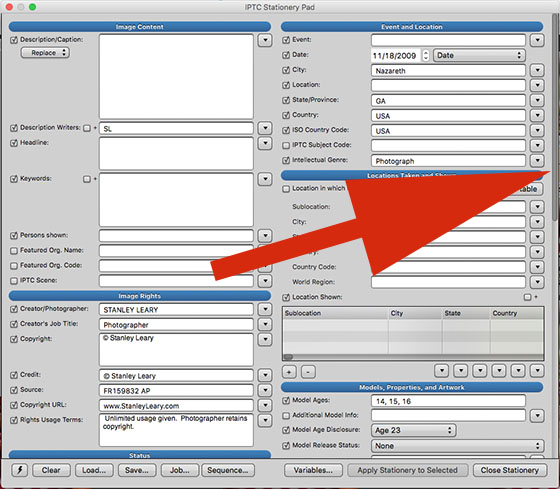

I then scrolled down to show you the rest of the form you can fill out:


MARKETING TIP!!!!


If you are a photographer you should be making your clients aware that you do this and this makes your photos more valuable to them, because they can find them!!!

If you embed all your photos with metadata IPTC information then more than just PhotoShop, PhotoMechanic, Lightroom or the search engines on your clients computers can see this information. There are online database systems that will read all this information and make this available to the world to find your images.

PhotoShelter is one such provider that many photographers and stock agencies use to help market photos. PhotoShelter interviewed me on how I helped Chick-fil-A to adopt their Libris system for their image archiving. You can see the interviews here on their blog post.

Not for the faint of heart


Accuracy with your metadata is critical. If you misspell a word then people will not find the image. This is very tedious work and many people don't do it because it is time consuming.

Most photographers are really not all that professional in their work. They just like to shoot. If professional football player behaved the way most "professional photographers" work on Sunday afternoon they would be carried off the field in a stretcher never to play the game again. You see professional football players lift weights, do cardiovascular workouts, watch what they eat and practice through the week. Most professional photographers are just showing up at game time and thinking that is all they have to do.

Knowing how your cost of doing business, practicing with stand in subjects before the subject is in front of the camera and doing the detail work like metadata is what truly separates the successful business photographers from those who only dream of it.

Now you might understand why someone else's work is published that you think is subpar to your work–their photos could be found by others.

Saturday, January 02, 2016

How to embed IPTC Metadata on NIKON D4 into each photo as you shoot


This is Nikon's IPTC Preset Manager application that you put onto your computer and fill out and then embed into every photo you shoot on your Nikon D4 Camera. Now compared to the PhotoMechanic fields there are not as many, but you are able to embed these into each photo as you shoot.

PhotoMecahnic's IPTC fields

IPTC Preset Manager is used to enter IPTC presets for cameras that embed IPTC information. "IPTC" stands for "International Press Telecommunications Council".

The really cool thing I discovered with my Nikon D4 was it has built-in support for 14 of the more important IPTC fields.

The D4 and the IPTC Preset Manager software support the following IPTC fields:

Caption
Event ID
Headline
Object Name
City
State
Country
Category
Supporting Category
Byline
Byline Title
Write/Editor
Credit
Source

You can save 10 Presets of these.

Besides doing this in the camera you can also type all these on your computer PC or Mac and then put them on your memory card and import them into the camera. That software is available from Nikon here http://tooldl.nikonimglib.com/iptc/index.html.en

It requires an up-to-date version of Microsoft Silverlight to download. here is that link http://www.microsoft.com/getsilverlight/Get-Started/Install/Default.aspx


For those assignments when you need to be sure all the photos are identified with some basic information this is a great way to do this as you shoot. Now all the photos have your information in each photo as you shoot.


Copyright


I also recommend setting your copyright information on your camera as well. This way every photo has your name set as the copyright holder.


Friday, April 27, 2012

Meeting expectations comes first


Many in today's iGeneration have had a childhood of T-ball, soccer, and dance classes where if they just participated, they were given a trophy. I assume most people know there is more to life than showing up on time -- but you'd be surprised how often meeting minimum standards will put you way ahead of the competition.

I taught in photojournalism at a local college. Every project I assigned was designed to give the students a real-world experience. They had three assignments: an environmental portrait, covering an event and a photo story.

The students were asked to turn in their assignments as if they were submitting them to an editor. They needed a cover letter to tell me about what they were submitting. They needed a folder with their selects and another folder with all the images they shot. Each of the photos in the selects needed to have a caption embedded in the IPTC fields. Most editors enjoy being able to send a photo to the designer which already has the caption in the photo. 

IPTC fields
IPTC IIM
This shows the Metadata panel of Bridge with IPTC IM, showing these fields are written to the file header. This screenshot shows the fields and includes a short description of what tags can be placed in the fields.
Some students forgot the captions, some forgot the cover letter and, yes, some were late handing them in. While most had everything done properly, we still had some where the captions were lacking the essential five Ws.
  • Who is it about?
  • What happened?
  • Where did it take place?
  • When did it take place?
  • Why did it happen?
I continue to hear horror stories from clients about photographers who didn't meet their minimum expectations. I even know of photographers who did the work and never handed in an invoice! It is amazing how just being sure all the elements are done for a project and turning them on time (or early!) will be received with excitement.
One of my favorite creative directors is Tony Messano. He gives sage advice. I can understand why he is asked to judge advertising work all over the world.

Tony expects a photographer to shoot the assignment the way Tony conceives it -- but his favorite photographers not only give him what he wants; they go beyond his concept and shoot it their way, too. Often, they will shoot it just as he says and then will push the idea a bit further with lighting composition or another element. They bring something extra to the table.

If you are meeting the expectations of your clients, you are doing better than most others in the industry. To rise to the top, go a little beyond the expectations.

Don't be satisfied with the trophy everyone gets for just showing up. Be the person singled out for going beyond the call of duty. Never stop looking for a unique approach or something different. The stretching will keep you youthful and nimble in today's ever-changing marketplace.

Second mile service assumes the first mile served

Today we hear so many talking about second mile service.  

Second mile service is something that comes from the Sermon on the Mount: “If someone forces you to go one mile, go with him two miles” (Matthew 5:41). In biblical times, a Roman soldier could compel someone to carry his pack for one mile, or 1,000 paces (two steps per pace). Jesus told his listeners to stop grudgingly counting their steps and instead to carry the pack a second mile.

Second mile service as Christ was trying to teach his followers is doing what is expected well and then doing even more. Christ’s earlier statement in the Sermon—“Let your light shine before men, that they may see your good deeds and praise your Father in heaven”—was letting the followers know this not only brought favor on them but God was honored as well. This is a good lesson for today's marketing student about the power of branding.

You are building a good reputation by giving superior service.

What is expected in the "First Mile?"
  • Treating people with honor, dignity and respect
  • Listening to the request of the client
  • Meeting the needs of the client
    • Well exposed photos
    • In focus
    • Photos of what was requested
  • Delivered on time
  • Invoiced in a timely matter
"Second Mile Service" possibilities
  • Early delivery of images
  • Well packaged presentation of the images
  • WOW factor photos
    • Different angle than they have seen before
    • Maybe a print of a special photo
    • Coffee table book of the photos
    • Slide show
  • Hand written thank you note
What is the number one thing you can do? Listen