Showing posts with label tethering. Show all posts

Saturday, April 12, 2014

WiFi Solution for Nikon D4


Nikon has two WiFi solutions for the Nikon D4. One costs $1,000 and the other $877.  Also I have not had the best of luck with Nikon's WiFi solutions in the past and especially with the Nikon D2Xs.  I bought the Nikon system for $600 and it dropped out so often and was almost impossible to sync.

When I was at PhotoShop World in Atlanta this week I ran into my friend Gary S Chapman and he asked if I had seen the CamRanger booth?  I had not and then after he walked me over there I decided to buy one after their demonstration. Gary said he would wait on my review before buying one. Next gizmo we find he goes first.
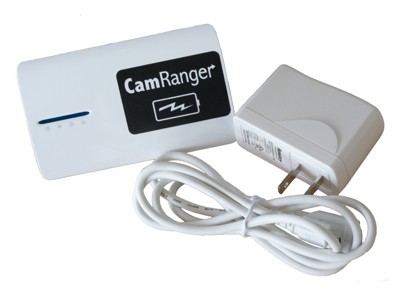
The cost of the system was $299.98 and they had a special going for that price to toss in an extra battery and charger.

It comes with USB cable to connect to your camera [pick your camera when ordering for correct cord] and CAD5 cable for updates. Also comes with small bag that hangs on your camera strap.

The charger looks identical just minus the WiFi part.

CamRanger currently supports a large number of both Canon and Nikon cameras. To see the full list and see all the features for each camera go to this link and you will find your camera and what features will work with your particular model.

The CamRanger is supported by iOS devices, Android devices, Mac and Windows computers, and the Kindle. All of the following apps are free and will work universally with the CamRanger unit! The CamRanger can be registered with multiple devices and can be used with one device or computer at a time.

I have an Android phone, an iPad and a Macbook Pro that I would use with the CamRanger.  All work just fine.

My Settings

From shooting with the Nikon WiFi and also using EyeFi SD card I learned a few things that made me want to get the best performance out of the CamRanger. By the way had EyeFi made a card that would work in the Nikon D4 I would have never looked at the CamRanger, but they don't so here I am using the CamRanger system.

Shoot RAW+JPEG—You are sending files over from one device to another. The bigger the file the slower it will take. You could shoot just JPEGs, but I prefer speed and therefore would prefer the smallest JPEG I can use to preview on the iPad for example. But when I need the higher resolution image I now create that from the RAW file.


Small JPEG—Go to the menu and pick image size under the camera icon. Select Small and this will help give you the smallest file size.


I would also use basic rather than fine. I want creative directors and art directors to use my iPad and see the images as I shoot sometimes. This way they are not over my shoulder, but can see the results.

If I am just tweaking the settings I can turn off the WiFi and then when I am ready for them to start seeing images turn the system on.


It connects right away to the iPad once you set it up. The setup just has you go into the WiFi settings on your device and select the CamRanger. Then you put in your serial # as the password. Once you are connected you use the CamRanger App that you downloaded for free to connect.

Two Main Ways I Use It—In general when I just want someone to see the images I just shoot and the images pop up as thumbnails and as a big image.


You can set up the controls in the App to client mode, which is where they just see the image and can star rate it if they like. I changed the default setting to have Auto View on so the image displays big when it is shot. The thumbnails let you go back and see previous images.

If I were shooting a lot I might turn off the Auto View and let someone just click on those thumbnails they want to see big without my latest image popping up while they were trying to see another image.

The second way I like to use the system is in Live Mode. You select Live Mode from the app and not from the camera.


In both modes you can see the camera settings and change them, unless you have Client View turned on.


I think that the CamRanger from my tests performs as well if not better than anything I have used up to now for WiFi connection to my camera.

Why use WiFi?

I first need to tell you about how I shot tethered for years when doing portraits. The images popped up and then quickly they were all in the computer where the subject was able to pick their images. Once I had the camera on a table and my foot caught the cable. Well that was $600+ repair for a shattered lens.

So the primary reason I started using WiFi was for the same reason I prefer radios for triggering flashes—No Cords.

When I am doing portraits the lighting is controlled and making the step of processing a RAW image pretty much a waste of my time. So here I can just shoot the Large/Fine setting JPEG and be done with it. Yes it takes a few seconds longer, but all the images are loaded on the computer and I can give the client all the images at the end of the shoot.

Another great reason to use WiFi is when I teach. I like to show everyone as I am doing setups, with lights for example, what I am doing. With a large screen TV or projector I can shoot and immediately they see the results and the settings on my camera. Great way to learn studio lighting or location lighting.


Sunday, May 13, 2012

Nikon D4: Tethering & 11 FPS Tips

Nikon D4 with 85mm f/1.4
Photoshop is complex

Photoshop got its start with a father and his two sons Glenn, John and Thomas Knoll back in 1988.  Not even the Knolls know all you can do with Photoshop.

It is quite common to go to some of the Adobe Photoshop users conventions and have a speaker show you how they got a result and on the same stage are the developers saying this is knew to them.

Nikon Cameras are complex

About two years ago when the Nikon D3S was just introduced, I was at a basketball game shooting with my new Nikon D3S. Next to me was Bob Rosato, who was a staff photographer for Sports Illustrated, getting a phone call just before the game started.

I could hear Bob saying he didn't know the answer to the caller. After hanging up, Bob looked at me and said that was Nikon calling asking him what settings he was using for sports.

This has been the case for many years with these new cameras that have complex computers in them. You have so many focusing modes to choose from. You can shoot is S, CL, or CH modes for how many frames the camera will fire when you push the shutter. Then you have which focusing modes you can choose from. Single, 9 group, 21 group, 51 group, Auto and then each of these in combination with the shutter mode gives you different results.

On top of those setting you have back focus settings for tracking your focus.

Who wants to be a millionaire?

Once you buy one of these cameras you will be heavily invested in learning all you can do the type of photography you do. This is important to point out that the cameras will do more than most any pro would ever use them to do. However, you must master it for your niche´.

Very quickly you will want to use a life line like they do on the TV hit show "Who wants to be a millionaire?" Sooner or later most pros will phone a friend to help them out. Even after reading the huge camera manual you will find yourself overlooking a detail.

So this week I get a call from my friend Paul Abell, a sports photographer, who shoots most of the pro teams and college teams in every sport. "Hey Stan, are you having trouble with your Nikon D4 follow focusing?" was the question from Paul.

Paul figured he had some setting in the camera not set correctly, because he knew Nikon would not introduce a camera with focusing issues after Canon had done so just recently.

I had not experienced the issue and told him I would look into it. Next day, I get another phone call from Paul. He had figured out the problem and wanted to tell me.

The answer is on page 112 of the camera manual.

Nikon D4 Camera manual page 112

My camera came from Nikon set on 10fps, but Paul's came with it set on 11fps. Once he switched to 10fps he was getting great results.

Camera manual stays with the camera

Most pros keep their new camera manual with their camera these days because of the situation Paul ran into. I don't know anyone who has memorized those huge manuals. My Toyota Sienna, which costs a lot more than my camera has a manual about half the size of the Nikon D4.

Until you have mastered all you need on the camera, keep your manual in the camera bag with you.

Tethering with Nikon D4

I have been tethering my camera to the laptop for studio shoots for many years. One of the main reasons l like to do this is with headshots. I may go to a company and do over 100 headshots in a day.  The department hiring me wants to match each headshot up to a name.

I use the Nikon Camera Control Pro 2 when I tether. It lets me put into the IPTC fields the name of each person before I shoot and then every time I shoot a photo the name of the person is embedded into each photo. I put in the name of each person before I shoot.


When I got my D4 I continued to do the same thing. However, now I had to change something. Earlier I wrote how with the Nikon D4 you can now embed this IPTC in the camera. (Earlier Blog)

I have enjoyed doing this, but now when I tether I must turn this off or the IPTC I use in Nikon Capture Control Pro 2 will not embed.


Nikon does a great job of telling the camera owner about what can and cannot be done, but for those of us who have trouble learning by reading, you need to practice.

Practice before you perform

It is very important to sit with your camera manual and read everything that you need to do what you shoot. Then practice shooting situations that are exactly like you will do for a job.

Paul was practicing in the backyard with his kids running at him to check the follow focus on his Nikon D4. He was having trouble. He sat down with his manual and then walked through all the settings and this is when he say parenthesis around his problem.

I hope by me sharing here about what I and other pros are learning about their Nikon D4 cameras will help you get the most out of your camera. Read your camera manual and then practice shooting changing the settings to see how you can get the most out of your camera in any given situation.