

In an earlier blog post I gave you my normal settings for the Nikon D4 for how I shoot. Here is a link to that post.
These are the settings that I use on my Nikon D4 for shooting most all sport action. Nikon has made it really nice to allow photographers to save these settings so they do not have to remember each and every little setting they like to use for a style of shooting.
If you go to Menu and under the camera icon pick the first item "Shooting menu bank." I have chosen C, which is my sports menu.

If you toggle into the "Shooting menu bank" you can rename those settings. Once you choose one of these settings everything you do to change the menu will be saved in that menu bank. I recommend to go ahead and try all my settings and then tweak them to your preferences.

Go to the camera icon again and look for "ISO sensitivity settings." Select this and you will then see this menu:

I turn on the "Auto ISO sensitivity control." Then I set the minimum shutter speed to 1/2000. The ISO setting is what you see in the smaller window below the menu. I set this to ISO 100 and then set the "Maximum sensitivity" to ISO 12800.
While I am in Aperture Mode shooting the camera will always pick 1/2000 shutter-speed. If in sunlight I am at ƒ/4 the shutter-speed may go as high at 1/8000 at ISO 100, but as the scene changes and the athlete is now in the shade the camera will automatically drop to 1/2000 @ ƒ/4 and then change also the ISO up until I can still shoot at 1/2000.
The only time the shutter speed will dip below the 1/2000 is if the ISO peaks out at 12800. If my aperture is wide open then the camera is doing everything that I would have done manually, but faster than I could ever adjust the camera. That is how you get more shots than the guy next to you.

Under the custom settings bank (Pencil Icon) I go into the auto focus setting.

I change the "Focus tracking with lock-on" from Normal to 4. What happens when I do this is the delay for the lens to refocus if something comes in between the camera and subject (like a referee). While I am following someone the camera will not refocus right away. This is something you need to try and pick what you like. You may want the lens to be more responsive and therefore go to setting 1 which will let the lens refocus instantly.
Focus Settings

I set the camera to AF mode. I also run this in continuous focus mode rather than single.


I go into the menu and select under custom settings the AF activation and choose "AF-ON only." This means when I press the shutter it will not focus the lens. It will only fire the camera. To focus I am using the AF-ON button on the back of the Nikon D4.

By changing these settings you will notice the camera will stay in focus and shoot faster frame rate. Great for following a baseball player sliding into a plate and another player trying to tag them or maybe a football player running towards you to score. You will find more photos tack sharp in a series.
I generally put my focus point dead center and lock it so I don't bump it. I am trying to get photos of moving subjects and off center is too difficult for me. I may crop later for a better composition, but I want the subject in focus first.

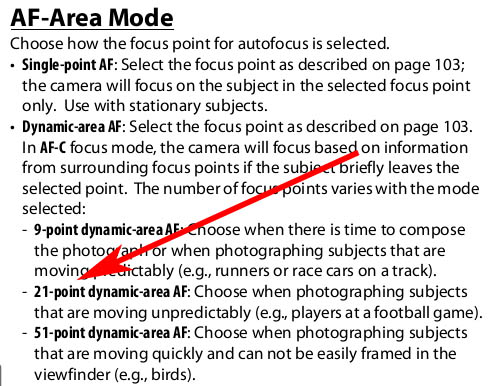
Now of the 51 different focus points you can choose groups of these to help with focusing. I went with Nikon's suggested 21-point dynamic-area AF.

Here are suggestions by Nikon in the manual:
The only other setting is on the lens that I turn on VR.


