Showing posts with label packing for travel. Show all posts

Friday, June 27, 2014

Two of the most made travel photography mistakes


Batteries

The number one mistake I see most often made by people traveling with their camera is not having enough fresh batteries.

Depending on your camera and flash you may need more than just one extra battery. My Nikon D4 camera can go most of a day shooting still images with one battery, however, if I start to shoot video or spend a lot of time reviewing images on my LCD then I can drain the battery and need a second.

My Fuji X-E2 goes through batteries and I have used all three batteries in a day before.

I recommend having at least one extra battery and before you leave for the day of shooting be sure both batteries are fully charged.

Every evening before you turn in for bed, be sure to recharge all your batteries. That way in the morning they will all be ready for another full day of shooting your travel.


Memory Cards

It is much easier to carry a few extra memory cards on a trip than it is to carry a laptop computer.

When this is a once in a lifetime trip it is wise to keep all the images on cards until you have them all on your computer and backed up in another location as well before formatting your cards.

Memory Card Tip

Always format your cards in your camera and not on your computer. The camera will do a better job of not just clearing the cards but creating the proper directories needed for the card to work properly with the camera.

Wednesday, May 07, 2014

Packing Tips for Photographers and Assistants flying

My international kit goes into 3 bags. 1) ThinkTank Airport TakeOff™ Rolling Camera Bag, 2)  ThinkTank Urban Disguise® 60 and 3) Travelpro Luggage Crew 9 26-Inch Expandable Rollaboard Suiter Bag [not shown] 

Flying internationally puts a stress on the most seasoned photographers. One of the main reasons is preparing for the travel to your location with Murphy's Law driving your decisions.

Assistants Tip #1

Interior of ThinkTank Airport TakeOff™ Rolling Camera Bag fully packed.

If you are a photo assistant your first priority is keeping track of all the photographer's gear and being sure it is put back exactly where the photographer packed it. Take photos of the gear so you can reference it later to repack it.

You may ask why put it exactly back where you started? A typical photographer will have a lot of little stuff that they may use on any job. When the assistant cannot put their hands on it the photographer will go first to the place they last put it.

Photographers Tip #1

Everything you carry should have a home spot—[a place that it is always put when not in use]. This will help you quickly find it when you need it and also when you are packing up to go you can easily see what is not in place to know you are missing something.

Having a system will not just help you, but every assistant that works for you.

International Travel with Credit Cards

Call your credit card companies before you travel. Let them know what countries you are traveling to and the dates of travel. This will keep your card from being frozen and you not being able to use it while traveling.

Often I find that using a credit card gives me the best exchange rate for purchases.

Telephone and Data Plans

Contact your provider and find the best plan for your travel. Verizon for example has a few different plans that will keep you from getting stuck with a high bill.

The most important reason for contacting them is for you to be aware of what you will be charged while you are not in your home country. There are generally three things that you are wanting to review: Phone call rate, Text Rates and Data Rate.

For the most part you are better off finding a local Wi-Fi and using it and connecting with family and friends through emails and/or Skype over using phone calls.

I recommend having an auto email response that lets people know you may take a little longer to respond and the same with a voice mail saying you are in meetings and will respond as soon as possible.

My International Kit

Packing for a road trip or domestic travel is much easier than international travel. If you can pack and travel internationally the domestic travel is a piece of cake.

I am normally traveling alone with no assistant when I travel. The type of work clients typically hire me to do is a one man band operation. I provide stills, video and audio from my coverages. This is usually combined into a package. This is a typical package that I might produce on overseas coverage.


So I am carrying enough gear to get this done in the smallest possible way for me to fly by myself.

I am always checking my TravelPro bag. Typically what I carry in this bag:
  • Clothing which is all wick away material which can be easily washed in a sink even and air dried
    • 4 shirts
    • 4 pants
    • 4 sets of underwear/socks
    • Safari hat
    • Windbreaker with a hoodie
  • Toiletries
  • Camera Gear
    • two tripods
    • two small light stands
    • two LED light sources 
What I am carrying on the plane is my 1) ThinkTank Airport TakeOff™ Rolling Camera Bag, and 2)  ThinkTank Urban Disguise® 60.  The rolling bag counts as my carryon luggage which must meet the international standard size. The safe maximum size is 45", in the form of a 22" x 14" x 9" bag.  Some airlines allow up to as much as 55", but most do not. The Airport TakeOff Exterior Dimensions: 14” W x 21” H x 8” D.
Airport Security™ V 2.0 Rolling Camera Bag
Sometimes when I fly international and I know the airline, like Delta, then I will fly with the Airport Security™ V 2.0 Rolling Camera Bag.  I can get more gear into this bag. Both of the rolling bags convert into a backpack, which comes in handy when you are in places where you cannot roll your bag.

Interior of my Airport Security™ V 2.0 Rolling Camera Bag fully packed.
My ThinkTank Urban Disguise® 60 while on the plane carries a lot of stuff and then when I arrive I change things around to use this as my working bag.

Inside the ThinkTank Urban Disguise® 60
  • Macbook Pro 15"
  • Two exterior hard drives
    • Mirror backup of hard drive
    • Exterior for all images and video
  • Headphones for video, but also to use on plane
  • iPad 
  • Power cords for 
    • Mac
    • iPad
    • Phone
  • Computer peripherals
    •  XQD Card Reader
    • Compact Flash Card Reader
Packing your gear with ThinkTank organizers
Think Tank Cable Management is great for all your cables

Think Tank Power House is designed for the Apple line of products to organize those charges and power supplies

ThinkTank Red Whips come with the organizing bag, but you can buy them individually to keep your cables wrapped.
We often talk about Digital Workflow and think mainly of digital capture to post production, but just as important is thinking of your entire workflow. By researching the airlines and knowing all you can about your travel can help you be prepared for Murphy's Law.

Last Tip

Ever since I have traveled overseas I have always gone by the US Customs office and registered my gear using the CBP Form 4457. CBP Form 4457 is used to register personal items before you travel abroad to clear customs easily when you bring those personal effects back to the United States. CBP Form 4457 shows that you had the items before leaving the U.S. and, therefore, allows a duty-free re-entry back to the U.S. Items may include watches, laptop computers or firearms  - those that have serial numbers or other unique permanent markings and other descriptions.

I have never had to use this form or show it, but I always fill one out for the sole reason that Murphy's Law exists.

Remember Murphy's Law states: Anything that can go wrong will go wrong. So be prepared.

Here is a quick video showing you how I pack for carry-on when traveling internationally.


Wednesday, October 09, 2013

Photographer packs for international travel


Packing for international travel has a lot of similarities for domestic, but the sizes are different.

Here is a quick video showing you how I pack for carry-on when traveling internationally.


The main bag for my cameras while traveling through the airports is the Think Tank Photo Airport TakeOff Camera Bag.


The second carry-on bag I use the the Think Tank Photo Urban Disguise 60.


Thursday, February 14, 2013

Photographers with Macs should travel with 2 external hard drives


When I travel I always carry two external hard drives. With the Mac computer you can have a complete copy of your hard drive on an external hard drive.

Making of mirror backup

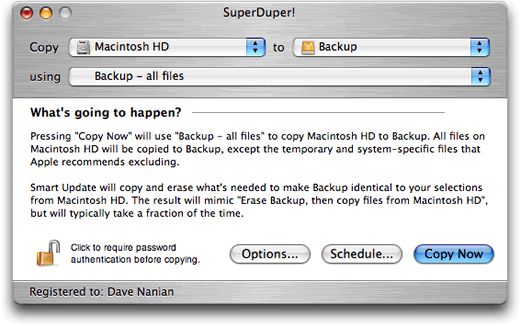
I use the SuperDuper software to create a duplicate hard drive of my computer.

There are a few benefits to having a copy of your hard drive. First of all it is a backup. If your computer hard drive fails and is not recoverable then you have everything on your backup hard drive. Well you will have almost everything, from the time you backed it up till the time you use it all that material will be lost.

When the software launches it will look like this screen to the right. The hard drive on your computer is on your left and then the hard drive you are backing up to is on the right. 

There are a few options, but I pick the full backup. The first time it backs it all up and later it will only add the changes.

For the Mac user when you have an external hard drive that has everything on it, you can borrow another person's Mac and launch your computer.

Turn the computer off and then when you launch the computer just hold down the option key until you see your hard drive pop up as an option. Just click on your hard drive and now you are on your computer. Now it is not quite as fast as if it were built in, but it works great.

If your computer is giving you trouble then running repair permissions from your external hard drive will let you do an even better job of clearing up errors on your main hard drive.

You see your computer cannot fix something that is running. The only way to fix it is to run it from another hard drive sometimes.

To run "Repair Permissions" go to your utilities folder and click on Disk Utilities. It looks like the icon here with the stethoscope on the hard drive. Pick the hard drive you want to repair and then click on "Repair Permissions"

Now one more software I recommend buying is DiskWarrior. This software will do major repairs to your hard drive for you. However you must either use their CD or an external hard drive to run it. It really improves the performance of my computer.

I recommend running it about once a month.

It does more than just repair permissions. If your computer crashes ever, run DiskWarrior to clean up any damage done.

The reason I use an external hard drive to backup my system is to have a duplicate with me in case of emergency and to help me improve the performance of my main hard drive.

Hard Drive for Pictures and Video

My second external hard drive is where I put all the photos and video I shoot on jobs. I never put them on the main hard drive.

First of all shooting with a Nikon D4 in RAW mode creates a 24 mb file. My first hard drive was only 40 mb.  It will not take long to fill a hard drive shooting in RAW mode.  Videos are easily hundreds of megs in size as a bare minimum. Some run a few gigs and having this size file will wear out your primary drive if you put them on and off repeatedly.

Beyond Travel

I have more than one backup of my primary drive. I have at least two more of these back in my home office. I also have multiple backups of the photos on different hard drive.

My recommendation is to always carry at least two external hard drives to do at least at a bare minimum what I am doing.

Monday, September 17, 2012

Advice for traveling abroad doing photography


An ounce of prevention is worth a pound of cure. 
– Benjamin Franklin


I love doing a foreign coverage for various reasons. The number one reason I like doing coverage abroad is the cross-cultural experience. A simple thing as what people eat at different meals is fascinating to me. How they live life is always different from me and then there are those things we have in common.

Since traveling is expensive and for most of the budgets I work with very limited as to how much you bring you need to plan ahead.

Questions to ask

  1. Baggage limits. 
    1. How many bags can you bring?
    2. What are the weight limits?
    3. Any gear you normally use not allowed, like battery packs?
  2. Power
    1. Do you have easy access to power?
    2. Is the power available 24 hours a day?
    3. Do you need converters? (Different size plugs, power converter from 220 to 110)
  3. Clothing
    1. Proper attire for the weather and social settings
    2. Do you have access to wash clothes? If so when and how often?
    3. Special shoes

If your trip is short you maybe able to not bring as much, but if you are gone for a couple weeks or longer you need to be prepared.

Plan to carry your cameras with you at all times is my suggestion. This is very important when flying.

Carry on bags are generally limited to a total of 45” this is the total of the length, width and height of the piece. There are standard sets of dimensions that go to make up these totals (for example, 22 x 14 x 9 is the standard for 45") and if you have a bag that is an unusual shape but still within the total number of inches, you may find it being rejected.

Although most domestic airlines have no limit on carry-on bag weight, internationally, you will find that some airlines set such ridiculously low carry-on weight limits (sometimes as little as 11 lbs) that the weight of an empty carry-on bag is more than the total weight you're allowed to take with you!
You need to be aware of these rules, or else the next time you see someone desperately unpacking and repacking their luggage on the floor by the check-in counter, that person might be you!

Flying with Camera Gear Tip

Put camera gear in your clothing. While it is not all that comfortable, you can put gear in pockets or photo vest and it not count for the weight.  Once on the plane you can put it back in the bag and put it away.

Now you might understand why so many photojournalist you see wear cargo style pants or wearing photo vests.  Because you don’t want to announce to thieves and pickpockets you are a photographer there are some clothing and bags that are more discrete.

Scottevest makes vests and jackets that hide your gear and do not look like photo vests.  I highly recommend this as a way to carry some gear when traveling.

Think Tank Urban Disguise 60
Think Tank Photo makes a variety of camera bags and the one I like is the Urban Disguise 60. It does look like a computer bag, but I think it doesn’t draw as much attention as some of the photo bags.

Image Storage

Until an image exists in three places it isn’t fully protected. The reason for this is transferring images from one place to another you can loose both systems while this is happening, that is why three places is the rule for all digital systems.

Many photographers will carry enough CF or SD cards to shoot and never have to reuse a card. This would give you the first of the three locations for images.


I use the SanHo Hyperdrive UDMA for copying all my cards when traveling. Here is an earlier blog post on it.

As long as it is feasible I also carry my Macbook Pro laptop and an external hard drive. I will ingest all the images into the laptop and will embed information about the photos, location and other information.

Camera Gear

It is easier to start with my barebones traveling camera gear.

  • 2 Nikon D4 Cameras
  • 2 EN-EL18 batteries 
  • 1 Nikon MH-26 battery charger
  • Nikon 14-24mm ƒ/2.8
  • Nikon 28-300mm ƒ/3.5-5.6
  • Nikon SB-900 Flash
  • Nikon SB-800 Flash
  • PocketWizard Mini1, AC3 & (2)TT5 
  • RODE Video Mic Pro 
  • Sony WCS999 Wireless Microphone System
  • 20 Sanyo AA Eneloop Batteries and battery Charger
  • 77mm ExpoDisc white balance
  • Nikon P7000 plus extra battery
  • 4 16gig XQD Memory Cards
  • 8 16gig CF Memory Cards
  • Tripod (link to blog on what I carry)

Since I am flying long distances most of the time, I prefer to bring my iPad along and use it on the plane to read books or catch up on email and surf the web.

You need to plan for the conditions you will be in and carry the gear necessary to get the photos. I always carry my Nikon P7000 because I can pull this out on the street and shoot without drawing attention to me. There are other times it is easier to shoot silently with the Nikon P7000 than with shooting with the Nikon D4.  It too will shoot on silent mode, but not as large of a file.

I carry two cameras as much for backup as for ease of shooting. I have two flashes to use if necessary and to have one as a backup.

My clothing
  • 3 pair of wick away cargo pants
  • 3 pair of wick away long sleeve shirts
  • 3 sets of underwear and socks
  • hiking boots or walking shoes
  • REI Towell
  • Safari hat
Here is an earlier blog I did about clothing for a photographer. It is important for me to be able to wash my own clothes and hang dry them. Using wick away clothing lets me wash them at night in a sink and have them dry by the morning by just hanging them up.  

I find I always keep my passport with me on trips. The most difficult thing when I travel is often having to pack-up every morning and take all the gear with you all day long from location to location. 

Like the boyscouts motto says "Always be prepared."

Friday, July 13, 2012

Cable Management and being prepared


When I travel I have a lot of different cords that I need to have. I need power cords for my computer, cellphone, ipad, and card readers. Thinktank has designed a few different Cable management bags. I use two of them.

To hold all these cables I use the Cable Management 30.


To store my RadioPoppers I use the Cable Management 10. You don't have to use these bags for just cables. When you go to your bags and need to find something these bags help keep you organized and more efficient when shooting.

Be sure you are prepared before you go to a job. Have everything you need or might need with you. Nothing is worse than being on a job knowing what you need you own, but is at home or your office.