Showing posts with label Fuji X E2. Show all posts

Tuesday, December 17, 2013

Fuji X E2 vs Nikon D4 Low Light Test

This is a comparison of the two cameras with just the light from a Christmas tree in the room.  Custom white balance using the ExpoDisc with both cameras.

Downloadable high resolution files links are below some of the photos so you can compare at 100%.

This is the setup
Comparison of ISO 6400 ƒ/4 and ƒ/5

[Figure 1] Fuji X E2, ISO 6400, ƒ/4, 1/7

Crop of Figure 1
[Figure 2] Nikon D4, ISO 6400, ƒ/4, 1/2.5 28-300mm

Crop of Figure 2
6400 @ ƒ/8

[Figure 3] Fuji X E2, ISO 6400, ƒ/8, 2.3 [high resolution file]
[Figure 4] Nikon D4, ISO 6400, ƒ/8, 1/1.2, 28-300mm [high resolution file]
ISO 12800 @ ƒ/8

[Figure 5] Fuji X E2, ISO 12800, ƒ/8, 1.0 [high resolution file]
[Figure 6] Nikon D4, ISO 12800, ƒ/8, 1/3, 28-300mm [high resolution file]
ISO 25600 @ ƒ/8

[Figure 7] Fuji X E2, ISO 25600, ƒ/8, 1/2 [high resolution file]
[Figure 8] Nikon D4, ISO 25600, ƒ/8, 1/4, 28-300mm [high resolution file]
Conclusion

They are different camera chips.  The one on the left is the traditional and the one on the right is in the Fuji X E2.


You have a different look and not like comparing similar chip designs.

I think the Fuji X E2 rocks and the main reason I wanted it was to be able to take photos in low light when I didn't want to carry the Nikon D4.  I think it works just fine.

I do not think the Fuji will replace the Nikon D4, especially when it comes to shooting sports, but for many of the situations I work in it can replace it.

Monday, December 16, 2013

Christmas Trees and Cameras have something in common

Fuji X E2 with the 18-55mm on a ProMaster XC525 Tripod

Both Christmas trees and cameras do better with tripods that support them and hold them steady.

Now for the past few weeks I have been testing the Fujifilm X E2 camera. Lately I was taking Christmas tree ornaments and enjoying using the Wifi to help upload the JPEGs quickly through my iPad using the Camera App you can download.


I also was taking portraits which I posted on the blog earlier. What I noticed right away was my pictures were not as sharp with the Christmas tree ornaments as compared to the studio. Well of course the ƒ-stop was greater, but really the sharpness issue was with camera motion.

Sure the Fuji camera has vibration reduction, but even when this is flawless a camera on a tripod cannot be beaten.

ISO 6400, ƒ/4, 1/35
Once I started taking photos with a good tripod the photos looked so much better.  It wasn't camera error, it was operator error that was causing my photos to not appear as sharp as they could.
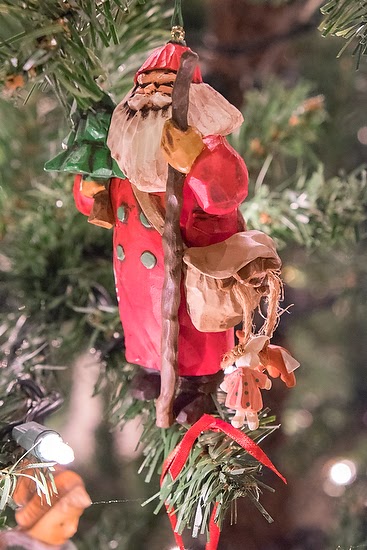
ISO 6400, ƒ/7.1, 1/10
The other thing I was able to do by shooting on a tripod was vary my depth-of-field since the camera movement at a slower ƒ-stop wouldn't affect the sharpness of the photos.

ISO 6400, ƒ/7.1, 1/9

ISO 6400, ƒ/4, 1/30
While the photos were definitely sharper there is another benefit with shooting on a tripod, composition.


While these photos don't win a pulitzer for composition, I was able to keep the camera still, which is hard to do when you are focusing as close as the camera will do on such small ornaments.

ISO 6400, ƒ/10, 1/7

Some of the ornaments like this of Snow White were tricky to shoot if you shot them wide open and that would be ƒ/4 on this camera and lens. I stopped the lens down to ƒ/10. How did I know that is what I wanted?

Fuji X E2 Feature Bonus
On the Fuji X E2 when you push the shutter release half way down the camera aperture closes to the setting you have and the viewfinder automatically adjusts in brightness so you can see your depth-of-field as it will look when you take the photo. On a traditional DSLR you have to wait for your eye to adjust to see the DOF. This is one of the really cool things about this new camera.


Now all these photos are using the existing light in the room, which was primarily the lights on the tree. By getting so close on all the ornaments the depth of field was pretty shallow and helped to pop them out from the tree and the background was cleaned up in the process.


My suggestion for any photographer who has a Christmas tree and a tripod is to take time and record some of your ornaments and maybe just post them to your Facebook, Instagram, Twitter or Pinterest account.  I have gotten more comments about these than many other posts I have done.

Maybe the reason is the ornaments is something many of us collect and understand.


At our house you are just as likely to see The Citadel ornaments, photography ornaments in addition to what the season is all about, those that remind us of Jesus.


Go get your tripod and let it slow you down this season to take the time to remember the reason for the season.

Friday, December 13, 2013

Loving the Fuji X E2 for Portraits


I am really loving the Fuji X E2 with the 18-55mm kit lens for shooting portraits.

The first time I was shooting in the studio on manual I discovered a problem with the default setting is the screen will be black when shooting in a studio with say settings of ISO 200, 1/180 and ƒ/11. I was talking with my friend Gibbs Frazeur who had bought the Fuji X100S and he called me up after I complained and told me to go to the manual on page 40.


You can change the preview exposure in manual mode to off so you can see what you are photographing with the available light. Then when the camera takes the photo it will capture the settings you have set on the camera.

What I really like with the camera is how sharp the photos are from the camera.  Here is a closeup of the eyes from the photo above.


Here is another photo of my daughter and then a closeup as well in that photo.


Closeup of the photo above.


Wednesday, December 11, 2013

Nikon D4 vs Fuji X E2 in Studio


Studio Comparison

First of all after importing the RAW images from the Nikon and Fuji into PhotoMechanic I noticed one thing right away—file size. The Fuji RAF file was 32MB as compared to the Nikon NEF 18.2MB.

After import I went into Adobe Lightroom and selected lens profile to change. The Fuji doesn't have that data yet for Lightroom. They have lens modulation optimizer built into the camera.  Here is how it works:


You may want to read about the Quest for Highest Possible Resolution by Fuji HERE.

Second step was getting the comparison closer to each other, so I used the eye dropper and clicked on the white background to get similar white balance.

Then I exported them.

See for yourself

Nikon D4, 28-300mm ISO 100 [Click on here for high res]
Fuji X E2, 18-55mm ISO 200 [Click here photo for high res]
I shot at the lowest recommended ISO for each manufacturer.  Click on the links above to see full resolution JPEG images.


Nikon D4 cropped version of the photo above
Fuji X E2 cropped version of the photo
I suggest downloading the high resolution and do all the pixel peeping you like.