Showing posts with label perspective. Show all posts

Wednesday, April 03, 2013

It is all about perspective


I learned about this phenomenon from Jay Maisel. Look at this photo, which way does the foot print go? In or out?


How about this foot print? Is it in or out?

Actually they are the same photo, just flipped. Your eye expects patterns a certain way and flipping the photo can change the topography.


The above photo of me is how most everyone sees me. I really never felt like it looks like me.


This is the photo as I see myself. What is the difference, it is just flipped or the mirror image that I see each morning in the mirror.

I suggest taking a digital photo of yourself and flip it and see if it feels more like yourself.

I showed this to a few of the students I was teaching lighting to in Kona, Hawaii and they all were amazed. 

Tuesday, July 03, 2012

Perspective Correction in Lightroom 4.1

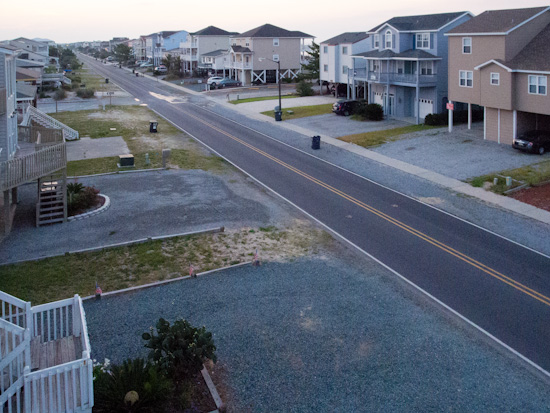
Shooting this on vacation at Ocean Isle, NC.  This is the final after correcting for color, exposure, and perspective.
While on vacation I shot this image off our balcony. Well it didn't look like this when I shot it.  It looked like this out of the camera see Figure 2.
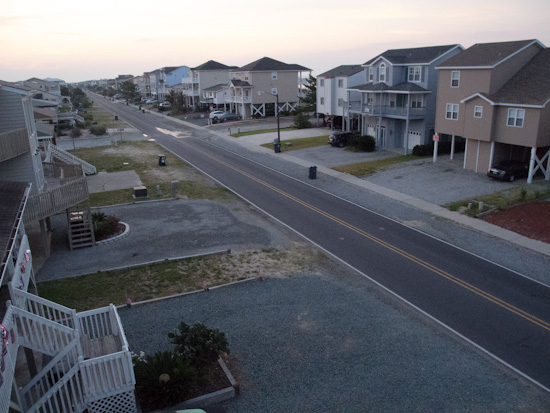
Can you see how the buildings are not straight and level as in the top photo?  (Figure 2)
Here are the steps I took

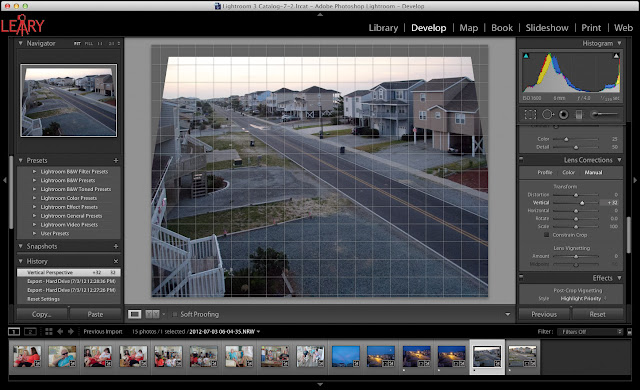
In Develop Module of Lightroom 4.1 I went down the to Lens Correction and clicked on Manual Tab. Then I adjusted the Vertical and Rotated the image.

After getting the buildings perspective correct by using the grid to help me, I then click on the Profile tab. I check the box and this is really cool. Each camera lens has some distortion and using the database built into Lightroom 4.1 it corrects for barrel distortion, chromatic aberration and other things inherently distorted with my Nikon P7000.
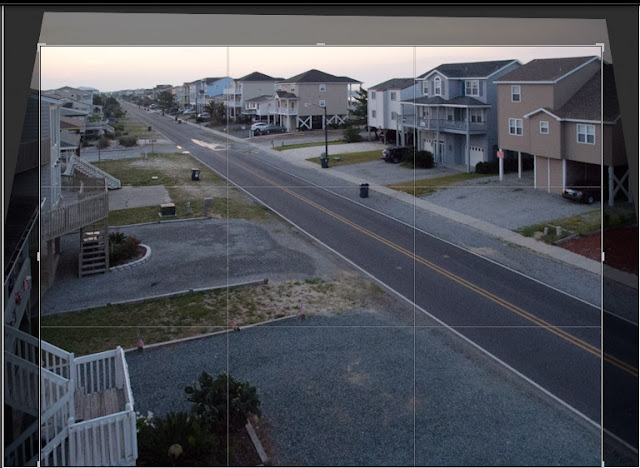
Now I crop
As you can see the photo now has some black areas that were not in the photo due to correcting perspective. I just select ⌘R (for cropping) and also lock the size of the image to the original and crop.

Now the photo needs some changes in contrast, exposure, color and more which I correct using the Basic menu in the Develop Module.


I often will choose the Auto setting in Tone to see what it gives me. Sometimes I like it and other times I will ⌘Z (undo) and start over. Sometimes I will just tweak the photo after using Auto.

Try correcting some of your photos using this technique.

Tuesday, May 24, 2011

Stop shooting from standing height only to improve your photos

Getting low not only gave a different perspective, but let me tie the people in the foreground to the signage in the background to help give context to what is going on with them.
Most of us all take pictures from standing height. It's convenient more than any other reason.

So few people vary their shooting position relative to subjects, so that when you do your photos have stopping power. There are basically 2 approaches that I recommend trying every time you photograph a subject: 1) bird's eye view and 2) worm's eye view.
I put the camera on the floor for this photo.  This takes some practice to be able to shoot this low and compose.  I have worked on this and can see what I am getting without always looking through the viewfinder.
Get as low as you can and shoot up to the subject. This is called the worm's eye view for obvious reason.
At almost every Chick-fil-A grand opening, the first 100 customers arrive 24 hours and camp out to get Chick-fil-A for a year for free.
Get up above the subject to help give us the overall perspective. This is called the bird's eye view.
To get the birds eye view I rented this crane for me to go up above.  I like using helicopters for this, but the helicopter would have created such a down draft of wind on all those tents it just wasn't worth risking it.
When you get low and high also vary the lens you choose. Shoot a wide, standard and tight shot from each perspective of low and high.

If you do this regularly you will find that as you explore the subject you may discover the unique angle not only has stopping power, but also may give you a decisive moment and perspective that tells the whole story in one photo.

Remember if a subject made you stop and take a 2nd look with your camera it most likely stop other folks as well—if you work at it to find the most interesting perspective.

Photos used by permission of Chick-fil-A