Showing posts with label shooting with video. Show all posts

Thursday, June 28, 2012

Multimedia coverage of a middle school service project


I drove up to Chattanooga, Tennessee yesterday to cover Roswell Presbyterian's Middle School Youth Group on their summer mission trip.  They partnered with SonServents on their Work Projects that also partnered with Widows Harvest Ministry to include: building wheelchair ramps and landings, scraping and painting houses, putting new roofs on homes, or landscaping and yard work.

Technical difficulties

Two lighting problems are: 1) under porch in middle of the day the youth were in some major shadows and 2) when they are painting the house they are facing the house and are always majorly back lit. While the house maybe white and act as a reflector, it is still a major light fall off. (photo by: Knolan Benfield)
 My solution for this problem was to put two hot shoe flashes up on light stands to light under the porch and even out the light.

There is a Nikon SB-900 on the far left on a light stand with the PocketWizard TT5 to control the TTL output of the light. On the far right is a Nikon SB-800 on light stand using the same setup for TTL. I have on my Nikon D4 the PocketWizard Mini TT1 and AC3 to trigger and control the output of the flashes.  They output is set to 0.
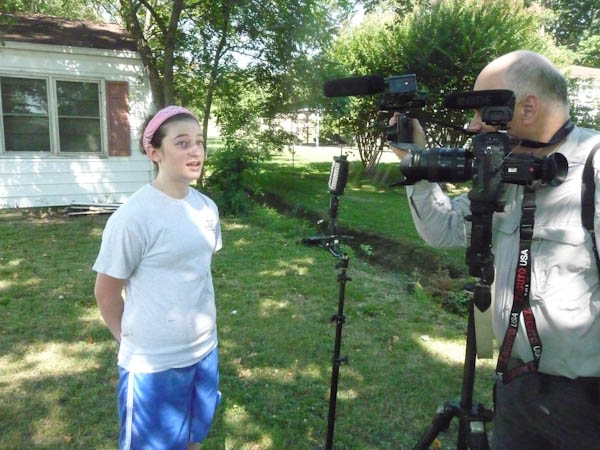
This is my daughter being interviewed by me for the project. (photo by: Knolan Benfield)

You can see the two camera setup here for the video interview. (Photo by: Knolan Benfield)
Video setup

I have a Nikon D4 with 28-300mm lens as the primary camera. I have the Zacuto’s Optical Viewfinder on the back of the camera to help with focusing. The microphone on the D4 is the Rode Video Pro. My second camera is the Nikon P7000 and I have the Rode Video microphone on it.

To help with lighting I have the LitePanel Micro Pro that helps with the shadows. The house behind her is in the sun and she is in the shade of the trees.  The light helps fill her face and by having her in the shade she is able to talk without squinting.

Editing

All the photos are edited using Adobe Lightroom 4.  I love this software because I can easily edit all the photos from a similar situation together.
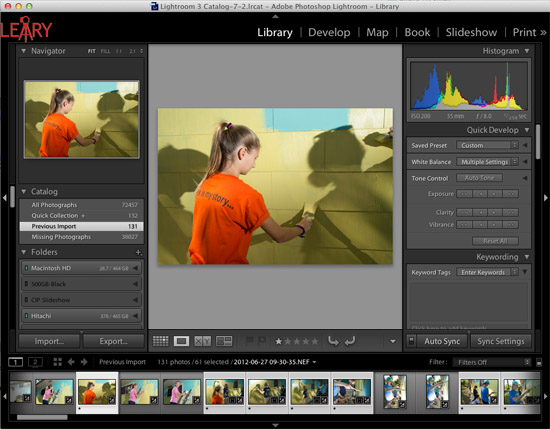

For video editing I used Final Cut Pro X. I enjoy the simplicity of this software to help do things like synchronizing two cameras. I don't have to convert the files from the different cameras when I import them.


I really enjoy combining the still photos with the video interviews. I think the stills help the audience have a visual pause to absorb a moment, whereas a video blows right through these moments too quickly.

Start to finish on this project

Got in our van at 7:30 a.m. and drove up to Chattanooga, Tennessee.  Was at the first location by 9:15 a.m.

We wrapped up shooting all three locations by 12:30 p.m.  Drove back to Roswell and stopped by a Barbeque place for lunch. Was home by 3:30 p.m.

Finished editing all the still photos by 5:00 p.m. and finished the combined project by 11:00 p.m.

Took a dinner break for about an hour.

I had Final Cut to crash and lost about an hour of time.

There you have a quick one day multimedia project.

Wednesday, November 16, 2011

Nikon P7000 bailed me out when my Nikon D3S couldn't

Nikon P7000 ISO 1600, f/5.6 1/40
Today one of the most dreaded photo shoots happened. I arrived at the client's location where I was asked to photograph a class of students in class and then afterwards we are doing their Christmas card photo.
The videographer needed no shutter noise on the video so I am using the Nikon P7000 ISO 1592 f/5 1/250
The client didn't realize they had a problem booking a still photographer and videographer to shoot in the same classroom at the same time. I was not told about this situation nor was the videographer.

This is the first time in a while I had been put into this situation and this time I had a new solution for the problem. You first need to know the problem. The biggest issue for still photographers shooting with videographers is all about sound. Our cameras make a mechanical noise when the shutter is fired that microphones pick up even more than the human ear or at least Murphy's Law seems to say so for the end result.
Nikon P7000 ISO 1600 f/3.2 1/130
On movie sets the still photographer often uses a blimp to eliminate the sound of the camera.  The costs start about $1,200 for one of these. I would typically rent one rather than buying one.
Jacobsen Blimp that you put your DSLR Camera into and put the tube over your lens to muffle or eliminate the shutter sound. I couldn't use it because I didn't have one or know that I needed it. So thankful that I always have my Nikon P7000 with me.
But today I had another solution. My point-and-shoot Nikon P7000 makes no noise at all when it fires. You actually can turn on and off a shutter noise.  They make this for those who want to hear their camera. I turn it off on mine.

The first time my friend, Dave Black, told me a few years ago he had used a similar Nikon camera during a PGA tournament and had the first photos of Tiger Woods and Phil Mickelson in their back swing for Sports Illustrated. Dave Black surprised the editors so much they almost had a heart attack. You are not suppose to take any pictures of the golfers until they hit the ball. The reason is the motor drives and shutter noises can distract the golfers.
Nikon P7000 ISO 1600 f/5.6 1/35
Dave Black had to quickly pull out his camera he used and fire it to show the editor. Click here for that story.

This story was in my head this morning and so I pulled out the Nikon P7000 and saved the day.

No question I would have preferred to shoot the photos with the Nikon D3s and have even cleaner looking files, but this was a good compromise to get photos and let them video at the same time.
By the way I did use my Nikon D3s for their group photo.  They wanted themselves in a circle for a particular design purpose. Nikon D3s ISO 200 f/9 1/50