Tuesday, March 12, 2013

Hand held light/flash meter


Flash/Light Meter simplifies lighting

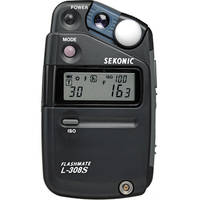
I think anyone using studio strobes will greatly benefit from a flash meter. Here is the older Sekonic Meter I use most of the time. 


The primary thing I use the flash meter for is getting the exposure for my subject. I always start here when shooting. The light I am measuring is the main light, because it is lighting my subject, not because of how bright it is.

Once you have this reading you can then take other readings. If you have two lights hitting the subject as in this photo below I wanted to control the contrast in the photo and using a flash meter was very helpful.

This is Masha, one of the School of Photography 1 students I was teaching in Hawaii a couple weeks ago. She was my model as I taught the class how to ratio lights.
In a very classic lighting setup like this the main light is 45º to the axis of the camera and subject. The second light is one the same axis as the camera, which is perpendicular to the background.

I took a reading first of the main light that is 45º to the right of the camera. ƒ/8 was the reading for the main light on ISO 100 and sync speed of 1/250.  I turned this light off and then worked at setting the second (fill light) behind the camera to ƒ/5.6, which is 1/2 the power of the first light.

Once this was set I turned both the lights on and took another reading and the combined ƒ-stop was ƒ/9.

Taking reading of the background for the top photo of the soldier
When I made the photo of the soldier I knew I wanted the background which was white to be two stops brighter than the subject. The subject was ƒ/16 and therefore background is ƒ/32.

Some people prefer to getting a reflective reading off the background, but either way the reading needs to be two stops greater than the subject.

Many photographer will measure the background with the lights on it at full power and then set the main light on the subject by under exposing by 2 ƒ-stops.

For the portrait of Masha, I had a black background and put a blue gel over the flash and metered the background to be 2 ƒ-stops under exposed as compared to the subject. In the photo of Masha the background was just a tad brighter than ƒ/4, which was 2 ƒ-stops darker than the ƒ/9 of the two lights combined hitting her face.

You can do all this using your histogram, but lets just say the explanation of how to do it is a lot more complex than this for using the flash meter.

Monday, March 11, 2013

Lighting Setup: Table-top Product Photography

White or even clear objects on a white background is very difficult to do and can become quite frustrating for even the experienced photographer.

This is a basic setup for a catalog photo shoot where the object needs to be stand out. 

I have couple of examples here. Next you will have the lighting diagram of the setup and finally there is a list of what I used.

Nikon D4, 28-300mm, ISO 100, 1/160, ƒ/20


Lighting Ratio

The trick in this lighting setup is the ratio of the background to the subject. I recommend you put 1 ƒ-stop more light on the background than on the subject.

How you measure this is with a flash meter. Always start with the light on the subject. I measured the light at ƒ/22 on the subject and then measured it on the background at ƒ/32. I then bracketed shots from ƒ/16 to ƒ/32 and pulled them up in Lightroom. After carefully looking at the detail in the subject and the background I chose to shoot at ƒ/20.

I also recommend evenly lighting the object for this type of catalog photography. This is why there are two 32" x 40" soft boxes at 45º angles from the camera to help wrap the object in light.

The middle 30" x 60" soft box in the diagram below is suspended flat over the table using the Manfrotto boom arm.

To avoid lens flare in this setup be sure the camera is ever so slightly not perpendicular to the background. Straight on can give you a lens flare.


Supplies

Here is a list of the supplies I used to make the photo.

I recommend using a vinyl floor or you can use
Sequentia 1/8-in x 4-ft x 8-ft White Fiberglass Reinforced Wall Panel that I bought at Lowes.  I use the backside which is smooth for the photos. You can also roll this up for storage.
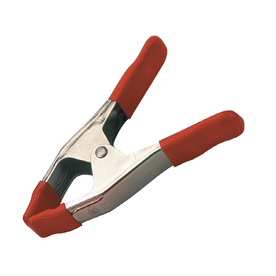
To hold the background in place I recommend BESSEY 2-in Metal Spring Clamps.  I have a bag of these I have handy for projects. They sell for just under $3 each.
You need something to hold up that background. You can get the Savage Background Port-A-Stand Kit for about $110.


The primary light for product work is a soft box. I have the 30" x 60" soft box from Paul C. Buff.  I like it for many reasons, but one of the reasons is how easy it is to setup and take down.
It works like an umbrella and has a lock that you screw tight to hold it in place.
I use the Alienbees B1600 monoblocs for my work. I like that the power is controlled with each head and I do not have to do math in my head as I did for power pack that split the power to different head. The Alienbees B1600 sell for $359.95 each. Since you are buying the directly from the manufacturer the price break is significant as compared to other lights that you buy from distributors.
Manfrotto 024B Boom is used to hang the large 30 x 60 soft box over objects. It sells for about $149.95 and comes with a 10 lb counterweight. I have a variety of other light stands I use. I put this on my JTL1200 Chrome Air Cushioned Stand (5016) which sells for $69.99.

Sekonic L-308S Flashmate - Digital Incident, Reflected and Flash Light Meter sells for $233.


Sunday, March 10, 2013

Photojournalism isn't trendy for a reason


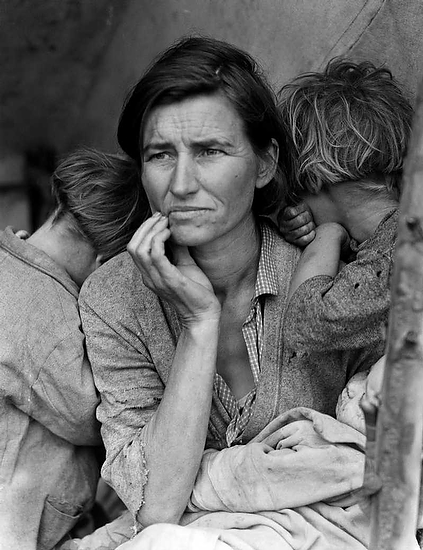
"Migrant Mother" is one of a series of photographs that Dorothea Lange made of Florence Owens Thompson and her children in February or March of 1936 in Nipomo, California.
Every other type of photography other than photojournalism goes through trends. You can even look at the hottest trends for each year. Here is a link to "The hottest photography trends of 2012."

Once you start using gimmicks to draw the attention of viewers you are tampering with the authenticity of the moment.

Howard Chapnick former president of Black Star Photo Agency had over fifty years of experience behind him when he wrote "Truth Needs No Ally: Inside Photojournalism" back in 1994. 

Howard Chapnick wrote "For documentary photography to be gripping and absorbing it must be imbued with immediacy, concrete reality and emotional involvement."

Photojournalism is about photos being relevant. To be relevant the photographer needs to capture what is impacting our world.

You cannot have concrete reality and trying to set or follow trends.

What really makes great photojournalism is a photojournalist who is passionate about the subject. They have become emotionally involved. This is not to say they have lost their objectiveness, but they have captured a real moment in a way the reader is pulled into the moment.

One of my favorite photo stories of all time is Eugene Smith's Country Doctor. Here is a link to the Time Life website with that story.

This story was ground breaking because Eugene Smith broke from the script of shooting photos on a list. He followed the doctor and captured whatever he was doing. The doctor drinking coffee at the end of a long day wasn't part of the script. It works because of it's immediacy, reality and emotional involvement. Here is that photo.

Photojournalists today have better cameras and technology to help them capture moments that those before couldn't even do. Tri-X film was not released in 35mm format until 1954, seven years after the "Country Doctor" story ran in Life Magazine. Smith was shooting with an ISO of 125 at best in 1948.

Today photographers can shoot at ISO 100 to 12,800 with the Nikon D4 and can even extend this range to ISO 50 to 204,800. You can now almost shoot in the dark and capture a subject.

In the future the only thing that will change in photojournalism is our equipment will get even better, but how we tell stories will remain the same.

The keys to great photojournalism:
  • Story ideas - You need to be able to find stories and distill them down to the nuggets which engage an audience.
  • People person - You need to be able to talk to almost every kind of person from the homeless to those who live in castles. You need to carry on conversations with the high school dropout to the research scientist.
  • Understand body language - The nuances of a head tilt, gestures and subtle eye movements are necessary to help not just communicate what is necessary to the story, but be sure it is honest and true to the character of the people.
  • Solid understanding of the camera - Getting a good exposure and in focus picture the camera can do with anyone. The photojournalist must understand when to change an aperture or shutter speed. They must understand which lens is the best to use in a situation.
  • Know light - Mastering light can help a photojournalist know where to stand to make the light work for them rather than against them. They also know when they must use auxiliary flash to reveal a story more powerfully without changing it.
When you start to feel like your work has plateaued this is not the time to think about trying a gimmick. You need to ask yourself if you are maximizing the technology to capture the stories. If you are a master at this you might just need to find a story that ignites the fire you have let go out.

Who do you know that could use someone help them tell their story? Who can benefit the most from your skills as a storyteller?

Maybe you just don't know of anything and this is the time to find some way to get plugged back into your community. Be sure you are reading the news for your community, region, nation and world.

Sometimes the best thing you can do is just take a break and recharge yourself. Vacations are needed for the creative to keep them fresh. Who needs a burned out photojournalist telling their story?

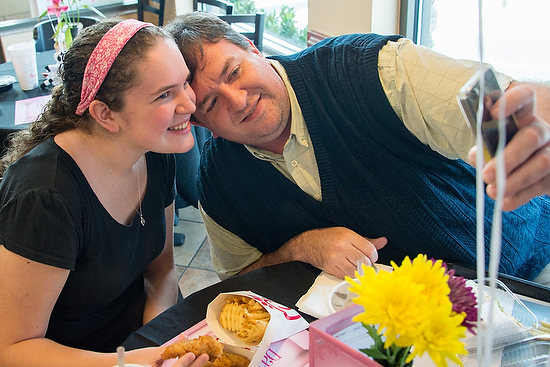
One of my favorite events to cover that will pull you out of a funk is Daddy Daughter Date Night at Chick-fil-A. This is from the event in Columbia, SC.
Photojournalism isn't about covering misery alone, it is about covering life. I suggest whatever kind of stories you have been covering to mix it up. Go and find a story on something outside your normal genre.


Friday, March 08, 2013

Black & White bails me out

Nikon D4, 70-200, ISO 12800, 1/1600, ƒ/2.8 with Custom White balance using ExpoDisc
I walked into the gym and I knew right away I was going to have problems. In an earlier post you will see a basketball shot in color that looks really good. To the untrained eye the gyms may look alike in their lighting, but they are far from it.

I talked about shooting under fluorescent lights earlier in a blog posting. You need to set your custom white balance while the shutter speed is below 1/100 to be sure the cycling of the lights don't affect the setting. Sodium Vapor lights, which these were are also cycling like the fluorescent lights.

The older the lights to more likely you will get color shifts and banding in the photos. One more factor that can affect the color shift is if the lights were not installed correctly. If some of the lights polarity is different from the others you will get banding.

While shooting this basketball game on this blog the minute I went above 1/100 I was getting color shift all through the image as you can see in the first photo. I was more interested in stopping the action than correct color.


By going to black and white I eliminate the color shifts in the photo. While I would prefer to have all the photos in color, unless you strobe the gym like I did here in this blog you really should just convert all the photos to black and white.

Nikon D4, 70-200, ISO 12800, 1/640, ƒ/2.8

Having the color off will make your work look amateurish. By eliminating the color you have now solved a problem with the color.

Nikon D4, 70-200, ISO 12800, 1/500, ƒ/2.8
Now please also note that while the ISO and the aperture never changed in all the photos, the shutter speed is different.

Here are my custom settings for this photo shoot from an earlier blog.  These are all for a Nikon D4
  • Auto ISO Low 100 - High 12,800
  • Minimum Shutter Speed set 1/2000
  • Shutter only when pushing release
  • Back button focusing
  • Auto Focus 21 pts centered and locked

Tuesday, March 05, 2013

Child Prodigy Photographer: Still Waiting


By definition a Child Prodigy is:
A child prodigy is someone who, at an early age, develops one or more skills at a level far beyond the norm for their age.[1] A prodigy has to be a child, or at least younger than 18 years, who is performing at the level of a highly trained adult in a very demanding field of endeavour.
Here is a formal list of child prodigies and as you can see there are no photographers. This past week I had some time to hang out with Dave Black. It was Dave that made this observation about there are no child prodigies in photography.

Why no prodigies?

Photography has been around now for two hundred years and you would think that if it were possible that we would have a prodigy by now.

While I do not know exactly why there are none I do have my hypothesis. Why even care if there are any prodigies? I believe the answer is that this is a learned field and that even if you have an artistic eye you still need to have some training to succeed.

No Degree Required

Photography does not require a degree or certification to practice. If you own a camera you can hang your shingle out as a professional photographer.

Many professionals have tried to create certificate programs to help them in their business. It doesn't work, because of one simple problem. People will look at your work and not your degree to hire you.

We look no further back in history than to 2012 to see what it takes to be a successful photographer. Why only last year? Well in many articles written about photography, many are saying that due to the camera phone that more photos are made than at any other time in history and that 2012 was the biggest of all time.

While many photos were made last year only some are rememberable. The great photos were not just made because the camera was set on "P" mode [professional mode].  Hopefully, you know I am joking. They are great because the photographer had a vision and knew how to manipulate the controls and/or light to capture what they were wanting.

Abstract Thought Required
"The formal operational stage begins at approximately age twelve [adolescence] and lasts into adulthood. During this time, people develop the ability to think about abstract concepts. Skills such as logical thought, deductive reasoning, and systematic planning also emerge during this stage.
While children tend to think very concretely and specifically in earlier stages, the ability to think about abstract concepts emerges during the formal operational stage. Instead of relying solely on previous experiences, children begin to consider possible outcomes and consequences of actions. This type of thinking is important in long-term planning.
In earlier stages, children used trial-and-error to solve problems. During the formal operational stage, the ability to systematically solve a problem in a logical and methodical way emerges. Children at the formal operational stage of cognitive development are often able to quickly plan an organized approach to solving a problem."
Formal Operational Stage of Cognitive Development
By Kendra Cherry, About.com Guide

While today's cameras allow you to point and shoot and come away with an image even for someone blessed with a visual eye needs to know how to manipulate the controls to give them an image that is superior.

Painters can include and exclude from the canvas much easier than a photographer can be selective with a camera. But both the painter and photographer must have a vision of what they are creating for the image to have impact.


Depth-of-field is a tool the photographer learns to use over time. How much will be in focus in front and behind the subject. There are varying degrees to which the photographer decides what is in focus and helps to create more impact by using this creative tool


Motion is either frozen or blurred in photography. While varying the shutter speed controls this the photographer can even choose to add motion to the camera during the exposure to keep a subject sharp and while at the same time blur the rest of the photograph.


Light is the greatest influence in photography. The absence of light alone means there is no photograph to be created. How the photographer chooses to use light helps improve the photograph. Sometimes they may choose to use the available light, light everything or only light part of the photo. They can also choose to vary the light values through out the photograph as well.  

Learning these technical tools and how to use them in conjunction with one another to create an artistic image requires abstract thought. 

Many photographers are masterful technicians who learn to use the aperture, shutter speed and light to give them different affects. 


Photographers who specialize photographing people must also master body language. Body language is everything from the very obvious smile down to the subtle pinky finger being raised while drinking tea.  To tell stories with people in the photos, the photographer must master the art of body language and all the technical skills of the camera to help make photos that impact the audience.

Photography is an acquired skill

The good news from all this is that even if someone feels like they do not have an artistic eye they can over time develop the skills to become an outstanding photographer. Those who do have an artistic eye must also study and learn how to master the camera and light to make photos or they will never be able to make photos—the camera will do it instead.

Great Visual Storytellers master these skills:
  1. Depth-of-field—You need to understand how the focal length of a lens and the lens opening in combination affect a photograph. After you understand how this works you need to then be able to look at a scene you want to photograph and consciously make a decision as to what you want in focus. 
  2. Shutter Speed—Not only does shutter speed help you freeze objects and blur parts of a photograph it can determine if you have color shifts in a photograph. You need to master how this impacts the photograph so you can choose how this tool with affect the photograph.
  3. Light—Seeing light and being able to capture the natural settings is a must. Once you have mastered capturing light as it is naturally, then you can manipulate it to help situations look more natural. You can add light to a scene to improve it. You can add light to overpower the natural light and make it what you want it to be. 
  4. Composition—Studying the masters in art will help you to know how to use compositional techniques to lead the viewer where you want in a photograph.
  5. Body Language—For the people photographer you need to understand what your subjects are communicating so you can control the message. You are able to anticipate the moment and capture the ones which help the message you want to communicate become clear and concise.
  6. Combining the techniques—After truly mastering each of these skills will you then be able to see how they are used in combination to create what you want, just like the painter who decides what will go onto the canvas.
While there are no prodigies, there are great photographers. Great photographers are self made through persistence. You can be a great photographer. You need only to master the skills and most importantly have a vision for what you want to appear on your canvas.

Monday, March 04, 2013

Portfolio Review

Tiare Nuualiitia (foreground) and Maile Powell listen to some of Stanley's instructions for lighting project for School of Photography 1 in Kona, Hawaii. Photo by Dennis Fahringer
Having your work reviewed can be a real nail biter for sure. While I was teaching in Kona, Hawaii Dennis Fahringer took this photo of the students listening to me. 

Each one of the students would be talking to me later about how difficult the assignments were, but now on the other side of them are grateful for the assignment.

Joanna Pinneo (center) reviews portfolios during the Southwestern Photojournalism Conference

During the Southwestern Photojournalism Conference students, pros and amateurs all wanted some time to have their work reviewed.  Here Joanna Pinneo is reviewing a photographers work.

You can even see in the guys body language how interested he is in her opinion.

Ayssa Fleming has her work reviewed by Bill Bangham during the School of Photography 1 in Kona, Hawaii.

Masha Shulgina has her work reviewed by Bill Bangham during the School of Photography 1 in Kona, Hawaii.

Franziska Escher has her work reviewed by Bill Bangham during the School of Photography 1 in Kona, Hawaii.
Stanley's Tips for a Portfolio Review
  • Let your work speak for itself. Please don't tell people all about the photos, if the photo doesn't do a good job of that on it's own then maybe it shouldn't be in the portfolio. If the person looking at the photos wants to know more they will ask.
  • Listen for what is not said as much as what is said. Often when reviewing a new photographer's work I am looking desperately for something good in the midst of snapshots. I want to encourage you, but I don't want you to think everything is great either. If I don't say anything about a photo, believe me it is because I am not impressed. If you ask me I might try to find something good to say, however, if you are fishing for compliments your work isn't that good.
  • Portfolio review isn't about praise of your work. If your work is the greatest of all time then maybe you will get a WOW and I wish I had your portfolio comment. You should be looking for pointers on what to do next time to make the photo better. 
  • Millimeters are critical for great photos. One example of how a millimeter can make or break a photo is just the difference in the camera's point of view and the subject's eyes. Just tad bit high and you look down at the subject. Eye level with the subject is something quite different than just a little lower and looking up. As you get better this is what you are looking for the little things to improve your work.
  • There are stages of growth in photography. Early in your career you may need some really basic tips to help improve your photography. At this point someone talking to you about a millimeter of difference will not help you. You have a lot of work to do before they can talk to you about those differences.
  • Establish a relationship if possible. You need to pick people to review your work that you can go back to later and show them again. They will be able to then see your growth and frankly if you paid attention.
  • Ask always if you can follow up and how. Plan to go out and shoot as soon as you can after your review. Work on the tips they pointed out to you and then somehow get them to see your revisions in that portfolio. You might just need to show them one project you are working on and get their feedback.
  • You never arrive at the top. There is always room for growth. Always seek out feedback on your work for the rest of your career. If you are not growing then you are dying. 
Justin and Ashley Veneman (on right) review a students work during the student workshop at the Southwestern Photojournalism Conference in Fort Worth, TX.

Dave Black, center, reviews a students work while other students look on and learn from the critique. In the back is Patrick Murphy-Racey (Tennessee hat) and Bob Carey who are also leaders in the workshop.

Anacleto Rapping (far left) and Joanna Pinneo (far right) review a student's work at the workshop.

This photo was take around 1:00 am. Dave Black stayed up until 2:00 am critiquing work of anyone who wanted his thoughts during the workshop.

Monday, February 25, 2013

Off camera flash and gels for the sky


When I get this kind of a situation on a cloudy day in Kona, Hawaii sometimes I fix it with flash.


By using a off camera flash I set the flash to be 2-stops over the available light and the camera I underexposed by -2 stops.


While this made the photo much better the color just didn't pop on the background.


Here I added a CTO +1 and did a custom white balance for the flash on the model's face. I could have also just dialed the white balance to tungsten and been very close.


The last photo I put a CTB +1 on the flash and then did a custom white balance. Because the camera is compensating for the blue in the flash it added orange to the entire scene. Where the flash is hitting the model is now the proper color temperature.

So, which one do you like the best? Do you like just a flash added or would you add a blue or orange filter to change the background?

Friday, February 22, 2013

Center stage isn't always the best photograph

Heartbridge performs at the Ohana Gathering on Thursday night in Kona, Hawaii.
When you are assigned to cover an event be careful not to focus all your attention on the center stage.

Loren Cunningham is the keynote speaker for the Ohana Gathering.
You have to get the center stage of course, but just look around and maybe even go outside and you might be surprised as to what you find.

Here I found that if I color balanced for the tungsten lighting on the stage the sky went even to a darker blue at dusk.


Tuesday, February 19, 2013

The environmental portrait

Tom Butler, coffee farmer on the Big Island of Hawaii. Tom sells the incredible 100% Kona coffee.
Nikon D4, 28-300mm (300), ISO 2000, ƒ/10, 1/200 - Off camera fill-flash using the Nikon SB-900 pointed at the coffee farmer.  The Flash is on the Pocketwizard TT5 and being triggered by the Mini TT1 on the Camera with the AC3 to control the output of the flash. Flash is 0 EV and the camera is 0 EV. A second Flash is setup the same way but on different channel at -3 EV pointed at the coffee on the branch.

Before I start this blog I want to thank Tom Butler for letting me photograph him. If you want some great 100% Kona coffee you can go to his website http://paradisefoundhawaii.com.

The environmental portrait is the bread and butter of the working photojournalist.  I wanted to show you three options I did for a portrait of a coffee grower in Hawaii.

I had to really look for the cherry looking coffee berries on the trees. It wasn't the time for harvesting, that had already been done earlier. This is the season for pruning.

This first choice you see here I tried to tie the coffee plant in with the coffee farmer.


The second choice has the coffee farmer in front of the plant rather than behind it as in the first photo.


The last choice I asked him to pick some of the coffee and present it to me for the photo.

You most likely like one of the three better than the other. However, the professional photographer will give options to the photo editor. The editor knows then that I worked the situation and tried to give them some options.

Which one is your favorite and why?

Thursday, February 14, 2013

Photographers with Macs should travel with 2 external hard drives


When I travel I always carry two external hard drives. With the Mac computer you can have a complete copy of your hard drive on an external hard drive.

Making of mirror backup

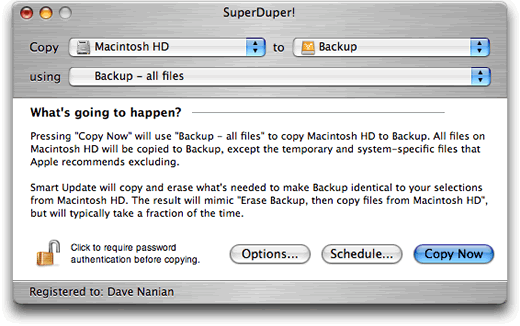
I use the SuperDuper software to create a duplicate hard drive of my computer.

There are a few benefits to having a copy of your hard drive. First of all it is a backup. If your computer hard drive fails and is not recoverable then you have everything on your backup hard drive. Well you will have almost everything, from the time you backed it up till the time you use it all that material will be lost.

When the software launches it will look like this screen to the right. The hard drive on your computer is on your left and then the hard drive you are backing up to is on the right. 

There are a few options, but I pick the full backup. The first time it backs it all up and later it will only add the changes.

For the Mac user when you have an external hard drive that has everything on it, you can borrow another person's Mac and launch your computer.

Turn the computer off and then when you launch the computer just hold down the option key until you see your hard drive pop up as an option. Just click on your hard drive and now you are on your computer. Now it is not quite as fast as if it were built in, but it works great.

If your computer is giving you trouble then running repair permissions from your external hard drive will let you do an even better job of clearing up errors on your main hard drive.

You see your computer cannot fix something that is running. The only way to fix it is to run it from another hard drive sometimes.

To run "Repair Permissions" go to your utilities folder and click on Disk Utilities. It looks like the icon here with the stethoscope on the hard drive. Pick the hard drive you want to repair and then click on "Repair Permissions"

Now one more software I recommend buying is DiskWarrior. This software will do major repairs to your hard drive for you. However you must either use their CD or an external hard drive to run it. It really improves the performance of my computer.

I recommend running it about once a month.

It does more than just repair permissions. If your computer crashes ever, run DiskWarrior to clean up any damage done.

The reason I use an external hard drive to backup my system is to have a duplicate with me in case of emergency and to help me improve the performance of my main hard drive.

Hard Drive for Pictures and Video

My second external hard drive is where I put all the photos and video I shoot on jobs. I never put them on the main hard drive.

First of all shooting with a Nikon D4 in RAW mode creates a 24 mb file. My first hard drive was only 40 mb.  It will not take long to fill a hard drive shooting in RAW mode.  Videos are easily hundreds of megs in size as a bare minimum. Some run a few gigs and having this size file will wear out your primary drive if you put them on and off repeatedly.

Beyond Travel

I have more than one backup of my primary drive. I have at least two more of these back in my home office. I also have multiple backups of the photos on different hard drive.

My recommendation is to always carry at least two external hard drives to do at least at a bare minimum what I am doing.